1
Disruption Score
If there are only two samples in the spreadsheet then, Partek cannot calculate a type by
gene ID interaction. In this case, the result spreadsheet will contain a column labeled
Disruption score. First, for each gene in the functional group Partek will calculate the
difference between the two samples. A z-test is used to compare the difference between
each gene and the rest of the genes in the functional group. The disruption score is the
minimum p-value from the z-tests comparing each gene to the rest in the functional group.
A low disruption score therefore indicates that at least one gene behaves differently from
the rest. This implies a change in the pattern of gene expression within the functional
group and potential disruption of the normal operation of the group. The category as a
whole may or may not exhibit differential expression in addition to the disruption.
Configuring the GO ANOVA Dialog
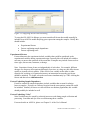
The setup dialog for GO ANOVA can be found in the Biological Interpretation section of
the workflow. It is recommended that GO ANOVA is run on the signal intensity sheet
after import and normalization, though GO ANOVA can be run on any spreadsheet with
samples on rows and genes on columns. If a child spreadsheet is selected, such as the
result of a prior ANOVA analysis, then the test will be automatically run on the parent
spreadsheet.
Upon selecting GO ANOVA, Partek will build library files to map from genes to functional
groups. In future versions, Partek will give the option to use custom gene mappings as
well. Please be patient, for denser arrays this may be time consuming, but will only happen
once per chip.
•
•
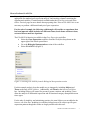
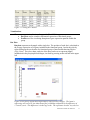
In the GO ANOVA dialog, select variables from the Experimental Factor(s) panel
and move them to the ANOVA Factor(s) panel to configure the ANOVA model.
When an item in the ANOVA Factor(s) list box is selected, the -> button next to the
Interact with gene (optional) list box will be enabled. Select the button to move the
selected item into the Interact with gene (optional) panel.
Select an item in the Interact with gene (optional) panel and then click the enabled
<- button to remove. Double clicking on an item will also move it to the other list
box.
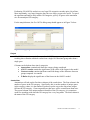
To save time when running GO ANOVA, the size of GO categories analyzed can be
limited using the Restrict analysis to function groups with fewer than __ genes. Large GO
categories may be less interesting and also take the most time to analyze. Partek
recommends setting the maximum category size to 150 genes or less, as it can make the
analysis much quicker. In the following example, the maximum category size will be set to
only 20 genes to allow the analysis to be run more quickly.
Partek User Guide: GO ANOVA
3