1
Display Range Setting
Define the speed range to react to
Diagnostic Functions
Easily verify proper operability of your DFS
Limit highest shown speed to prevent misuse
like intentional speeding
Diagnostic check verifies data memory
integrity, supply voltage, radar operation,
GSM communication, Bluetooth comm. etc.
Limit lowest shown speed to avoid detection
of pedestrians or bicycles
Self diagnostic check is executed at startup, at
midnight or on user demand
High Visibility
Catch driver attention anytime
Status codes indicate component status
Increased sign visibility at night due to 3M
Diamond Grade reflective sheeting
Speed Data Analysis
Download and analyze speed data with software
Combineable with DG coated backboard for
additional static messages
Measure traffic volume and speed at a location
Various Power Options
Provide power to DFS anywhere
Operate with line power using power supply
unit, e.g. for fixed installations
Operate with one or two optional 17Ah
batteries for mobile applications
Operate with battery buffered line power using
optional charger in locations with temporary
only line power (e.g. street lamp)
Various Communication Options
Communicate with DFS from any distance
USB cable for local data link to PC
Bluetooth for wireless link to PC or PDA
Optional GSM for long distance wireless data
connection from your office (requires data
SIM card from local GSM provider)
Various Installation Options
Install DFS as you need
Use DFS unit stand alone for fixed
installations and connected to line power
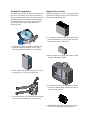
Use optional mounting box for mobile
installations and to protect accessories
Detach display from frame for integration in
customized static sign board or cabinet
SMS Notification (with optional GSM)
Let the DFS tell you when it needs attention
SMS on low (battery) voltage
SMS when memory almost full or full and old
data about to be overwritten
SMS when diagnostic check identifies defect
Create overview tables and several graphical
charts with just a few mouse clicks
Create before & after studies to determine
speed reduction effectiveness of DFS
Identify periodically speeding individuals
Weekday Scheduling
Define on/off time schedules per weekday
Prevent habituation of drivers and increase
credibility by activating the DFS only when
needed, e.g. at school time in front of school
Save power to increase battery time and
increase LED life-time
Userfriendly Design
Save cost and time for installation and use
Lightweight design (DFS only 8,5 kg) for
transport and mounting by one person
Software user interface design for highest user
friendliness
Optional battery & mounting box for a
professional installation to different post
diameters (60 – 140 mm)
Safe and secure storage of accessories in
optional battery & mounting box
High Quality Standard
Trust in highest reliability
Closed design ensures protection against
humidity and dust
Self diagnostic functions allow quick
verification of operability
SMS notification function informs you about
service needs (with GSM option)