1
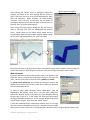
After selecting the “MESH” button, a dialog box displays the
progress and status of the mesh building process, shown at
right. If there are any errors, they will be displayed here, along
with their resolution. When complete, the dialog displays
“Finished” as the last line, and the user has the option of
scrolling the dialog text to review the mesh creation process, or
selecting “Exit” to dismiss the dialog box.
Mesh Progress Dialog Box
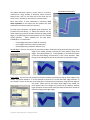
After exiting the mesh progress dialog box, we can view the
mesh by selecting “Plot” from the FEMdesigner AD explorer
menu. Shown below are the Alibre Design model and the
corresponding mesh that was created using the default values
for the mesh, and displayed using the “plot” command.
Notice that the mesh is relatively coarse when compared to the geometric features, but every edge has
at least two elements, which will give us accurate results for most general analysis requirements.
Mesh refinement
If analysis requirements dictate that specific areas of the geometry are
of greater interest and require more detailed results, we can refine the
mesh. There are two ways to refine the mesh: globally and locally.
For global mesh refinement, we indicate the maximum element size
allowed for the entire mesh, and the mesh will be built with elements
that do not exceed that size.
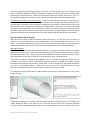
To specify a global mesh refinement, select “Build Mesh” from the
FEMdesigner AD explorer menu, and in the part mesh dialog box,
expand the “Bounds” section in the lower part of the dialog by selecting
the plus sign (+) next to it. In the “upper size” data entry field, specify
the largest allowable element size. In this example we are using a value
of 0.05 (shown at right). Then select the “MESH” button.
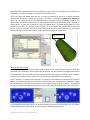
A mesh will automatically be created with elements that are no larger
than the maximum allowable size entered. Using the same part shown
above, we can create a mesh that is considerably more dense than when using the default element size.
Copyright © 2014 FEMdesigner Ltd. All Rights Reserved