1
1
1
2
3
4
5
5.1
6
6.1
7
7.1
7.2
7.3
7.4
7.5
7.6
7.7
7.8
7.9
7.10
8
8.1
8.2
8.3
9
9.1
9.2
9.3
Table of Contents
Table of Contents .......................................................................................... 2
Change History .............................................................................................. 3
About this Manual.......................................................................................... 4
Introduction.................................................................................................... 5
Warranty and Support ................................................................................... 6
Warranty Cover ............................................................................................... 6
Safety, Compliance and Approvals .............................................................. 7
Safe Operating Procedures ............................................................................. 7
Getting Started and Basic Operation ........................................................... 8
Which Model Do I Have ................................................................................... 8
Controls ........................................................................................................... 8
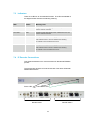
Indicators ......................................................................................................... 9
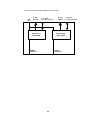
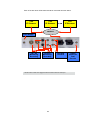
IP Decoder Connections .................................................................................. 9
Installation Notes ........................................................................................... 15
Network Requirements .................................................................................. 15
Initial IP Setup ............................................................................................... 16
Powering on the System ................................................................................ 17
Using the Browser Controller ......................................................................... 18
Playing a Stream ........................................................................................ 19
Advanced Operation.................................................................................... 23
Setting up Network Interfaces ........................................................................ 23
Decoder Options............................................................................................ 25
Licence Upgrades.......................................................................................... 27
Connector Pin Outs ..................................................................................... 29
Power - 4-pin 0B LEMO Socket ..................................................................... 29
Audio - 5-pin 0B LEMO Socket ...................................................................... 29
RS232 Control / Data - 3-pin 0B LEMO Socket.............................................. 29
2