1
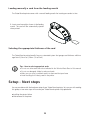
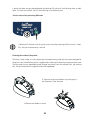
Loading manually a card from the feeding mouth
The Tattoo Rewrite printer comes with a manual feeding mouth for inserting one card at a time.
1. Insert a card manually as shown in the feeding
mouth. The card will be automatically ejected
when printed.
Selecting the appropriate thickness of the card
The Tattoo Rewrite printer benefits from an automated system that gauges card thickness whithin a
rage from 0,25mm to 0,76mm (10 to 30mil).
Tips – How to select appropriate cards:
■ Do not use other cards than those indicated in the Technical Data Sheet of this manual
■ Do not use damaged, folded or embossed cards
■ Make sure you store your blank cards in a clean and dust-proof area
■ Avoid inserting foul or dusty cards in the printer
Setup - Next steps
You are now done with the hardware setup of your Tattoo Rewrite printer. Yet, carry on with reading
this guide, as two extra steps will to make your Tattoo Rewrite printer fully operational:
Installing the printer’s driver
■ Maintenance of the printer
■
10