1
A printer that does not get cleaned despite the cleaning LED notice will start blinking when an additional 100 cards are inserted. The LED starts blinking in the following way:
Printer status after processing 600 cards
A blinking LED indicates that the printer needs immediate cleaning (within the next 5 cards).
Else, the print head warranty is waived.
Cleaning the inside of the printer
Cleaning is rather simple, as it only requires pre-saturated cleaning cards that are custom-designed for
the printer. Your Tattoo Rewrite printer is shipped with a cleaning kit containing samples of these cards.
Cleaning cards that are repeatedly passed through the printer clean the transport rolls, the cleaning
rolls, the print head and the magnetic head (when applicable).
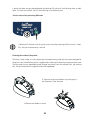
1. Open the cover and withdraw any card lying inside the printer. Close the cover.
2. Remove the feeder as shown
20