1
Table of contents
Copyright Information ....................................................................................... 3
Chapter 1 Safety Instructions .......................................................................... 4
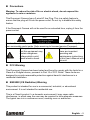
Precautions .................................................................................................. 5
FCC Warning................................................................................................ 5
EN55022 (CE Radiation) Warning ............................................................... 5
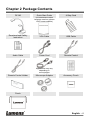
Chapter 2 Package Contents ............................................................................ 6
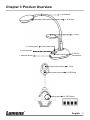
Chapter 3 Product Overview ............................................................................ 7
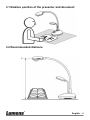
3.1
Relative position of the presenter and document ............................... 8
3.2
Recommended distance ..................................................................... 8
Chapter 4 Installation and Connections.......................................................... 9
4.1
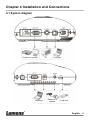
System diagram.................................................................................. 9
4.2
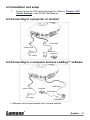
Installation and setup ........................................................................ 10
4.3
Connecting to a projector or monitor ................................................ 10
4.4
Connecting to a computer and use Ladibug™ software .................. 10
4.5
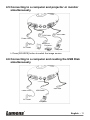
Connecting to a computer and projector or monitor simultaneously .. 11
4.6
Connecting to a computer and reading the USB Disk simultaneously . 11
4.7
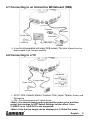
Connecting to an Interactive Whiteboard (IWB) ............................... 12
4.8
Connecting to a TV ........................................................................... 12
4.9
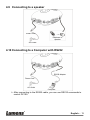
Connecting to a speaker .................................................................. 13
4.10 Connecting to a Computer with RS232 ............................................ 13
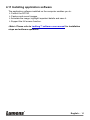
4.11 Installing application software........................................................... 14
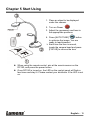
Chapter 5 Start Using ...................................................................................... 15
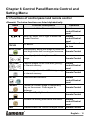
Chapter 6 Control Panel/Remote Control and Setting Menu ...................... 16
6.1
Functions of control panel and remote control ................................. 16
6.2
Setting Menu .................................................................................... 18
Chapter 7 Descriptions of major functions .................................................. 23
7.1
I would like to automatically adjust the image to have the best
brightness and focusing performance .............................................. 23
English - 4