1
SECTION 3 - Main Page
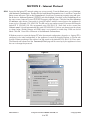
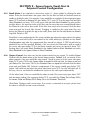
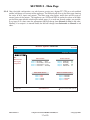
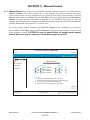
3.1.0 After the initial configuration, any web browser running on a laptop/PC, PDA or a web enabled
mobile/cell phone can connect to the appliance. The Maverick will serve up the Main page showing
the status of all 4 inputs and outputs. The Main page also displays email alerts and the auto or
manual status of the outputs. The appliance uses AJAX and XML to update the values of all fields
on the Main page without refreshing the whole page. As a result one second updates are possible.
If any input is in a alert state, the appropriate field will change from Normal to Alert in red color.
Similarly, if an output is in manual mode, the field will change from Automatic to Manual in red
color.
IP Sensor Appliance: MAMAC UNO
May 9, 2008
13.34:59
Configuration | Password/Clock
Main
INPUT VALUES
Manual Control
Data Logging
Configuration
OUTPUT VALUES
Sensor 1:
Lab Temp :
Output 1:
Supply Fan :
On
Sensor 2:
Lab Humidity: : 19.0 % RH
70.3 F
Output 2:
DX Cooling :
On
Sensor 3:
Duct Pressure : 2.4 “wc
Output 3:
Humidifier :
Off
Sensor 4:
Fan Current :
Output 4:
Exhaust Fan :
On
25.0 Amps
EMAIL ALERT STATUS
c
Copyright 2008
DN IS-IPPC101.1
MANUAL CONTROL STATUS
Sensor 1: Alert
Output 1:
Automatic
Sensor 2: Alert
Output 2:
Automatic
Sensor 3: Normal
Output 3:
Automatic
Sensor 4: Normal
Output 4:
Manual
www.mamacsys.com
® Registered trademark MAMAC SYSTEMS, Inc.
17 of 20
R
Registered trademark MAMAC Systems, Inc.
© Copyright 2008