1
SECTION 2 - Meter Configuration
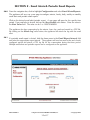
2.5.0 Caution: Before starting the IP Sub Metering Appliance, please insure that the time and date
are configured to maintain data integrity.
2.5.1 Note: Disconnect the pulse input terminal block.
2.5.2 Reset Meter: Click the Reset Meter button to reset all data fields to zero.
2.5.3
Constant: Input the meter constant. The meter constant is the value per pulse. For
example, if each pulse is equal to 100 Watts and the unit of measure is KWH, the meter
constant will be 0.100. Similarly, if the water meter gives a pulse each gallon of flow per
minute and the units are GPM, the meter constant will be 1.000. Meter constant can be from
0.001 to a maximum of 9.999.
2.5.4 Units: Enter units of measure. Example: KWH, GPM, LPM, CFM, BTUH, MWH, etc.
Maximum 5 alpha and/or numeric characters (uppercase and/or lowercase).
2.5.5 Save: Click to save.
2.5.6 Note: Re-connect the pulse input terminal block. The IP Sub Metering Appliance is now
ready to log data.
IP Sub Metering Appliance: UNO Meter
May 1, 2009
12:57:39
Configuration | Meter
Main
Data Logging
METER CONFIGURATION
Constant:
1.000
Units:
KWH
Configuration
Save
Reset Meter
c
Copyright 2009
DN IS-IPSM101.1
www.mamacsys.com
® Registered trademark MAMAC SYSTEMS, Inc.
11 of 17
R
Registered trademark MAMAC Systems, Inc.
© Copyright 2009