1
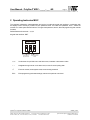
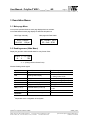
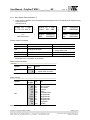
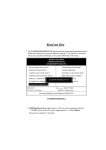
User Manual - PolyGard® MGC - _ _ _ - _ _ -US Page 4 2 Operating Instrucion MGC The complete configuration, parameterization and service is made via keypad user interface in combination with the display screen. Security is provided via two password levels. The lower level password, level 1, allows the override or to reset system status functions. The upper level password, level 2, allows all pogramming and override functions. Default Password lower level = 1,2,3,4 Keypad User Interface “DBT” INTEC - Control 08.15.03 1.22 pm ESC LED “Yellow” flashes at Low, Med or High Threshold LED “Red” flashes at System/Sensor Failed ⇔⇐ Scrolls down & up in Main menu and Sub menus; increases or decreases a value. ∧∨ Navigates through menus on the same level; moves of cursor inputing data. ↵ Enter sub menus; issues system reset; stores security password. ESC Exits programming and saves settings; returns to the previous menu level. PolyGard is a registered trademark of MSR Phone: (858) 578-7887 & (888) GO INTEC Fax (858) 578-4633 & (888) FX INTEC INTEC Controls, Inc., P.O. Box 12506, La Jolla, CA 92039 www.inteccontrols.com GAMGC_01US Specification subject to change without notice. Printed in USA 030918