1
CC2431
10.1 Menus and buttons
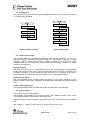
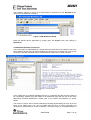
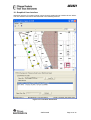
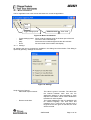
The PC application has a few menus and buttons to control the application.
Stop
Start
Toggle settings panel
Slider for zoom
Zoom level
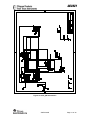
Figure 18: Menus and buttons
-
Toggle settings panel:
Start:
Stop:
Zoom:
Show / hide the settings panel in the lower part of the GUI
Connect to the location dongle
Disconnect the location dongle and clear all node lists
Set zoom level of the location area display
10.1.1 Settings
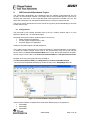
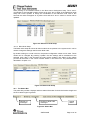
All settings that can be changed are available in the dialog box shown below. This dialog is
opened by pressing “Settings” in the menu.
Figure 19: Settings
Node discovery interval:
- Start Node request interval:
-
Remove node after:
This value is given in seconds. The value sets
the interval between each time the PC
application attempt to start broadcast of node
requests. The value 0 can be used to disable the
broadcast of node requests.
The nodes registered by the PC application will
be checked regularly. The time since last
message from a node will be checked and if
longer than the time given in this field, the node
will be removed.
SWRU076D
Page 21 of 32