1
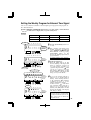
Enabling Override and Transfer Functions
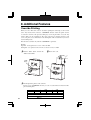
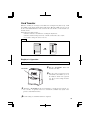
Enabling these functions allows employees to move time totals on card or transfer to another
card. (Not recommended.) See Additional Features sections for how these features are used.
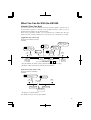
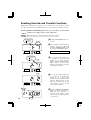
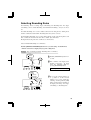
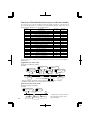
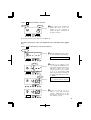
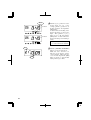
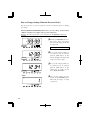
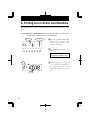
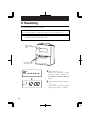
Push the [SETTING START/END] button before you start setting. At that moment,
"
" is indicated on a display and you go into setting mode.
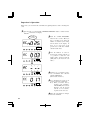
Example Make both "Override" and "Card Transfer" functions enabled.
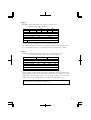
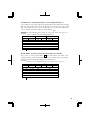
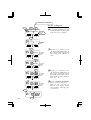
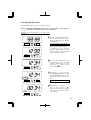
[OVERRIDE]
1 Disabled
2 Enabled
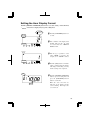
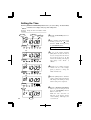
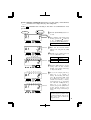
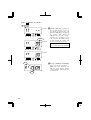
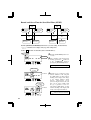
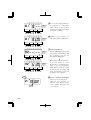
1 Push the [FUNCTION] button for 2
BUTTON
FUNC.
seconds.
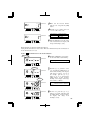
2 Once a number on the display starts
flashing, position the " " mark
under the "BUTTON FUNC." mark
by pressing [FUNCTION] button.
SET
FUNCTION
[TRANSFER]
1 Disabled
2 Enabled
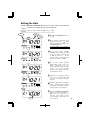
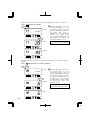
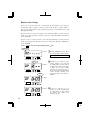
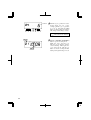
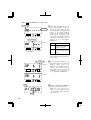
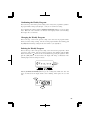
3 In case of the example, push the [+]
BUTTON
FUNC.
or [-] button to set the left-side
number at "2" to make "Override"
function enabled and then push the
[SET] button. At that moment,
flashing of the display will change
to the right-side number.
SET
FUNCTION
BUTTON
FUNC.
SET
FUNCTION
Date
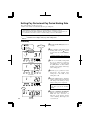
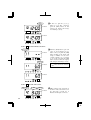
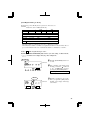
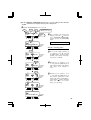
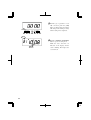
4 In case of the example, push the [+]
or [-] button to set the right-side
number at "2" to make "Card
Transfer" function enabled and then
push the [SET] button. At that
moment, the display will change
from flashing to steady, and the
setting is now completed.
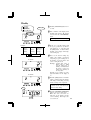
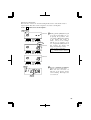
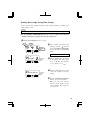
5 Push the [SETTING START/END]
button to get out of setting mode.
Make sure "date" and "time" are
indicated on the display and the
colon is flashing. Then replace the
cover and lock.
AM
22
A flashing number can be changed.
Colon
28