1
BMP GRAPHIC EDITOR
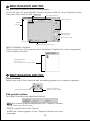
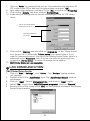
Use the Graphic Editor to edit or create graphics of your own. To open the Edit Graphic window, click on bmp Graphics on the
menu bar, then click on Edit Graphics
Editor area
Edit erea selection
Editor tools box
Graphic
library
display zoom in
and zoom out
select color to edit
Graphic data function select
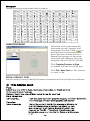
Select Graphic window
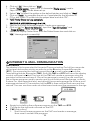
Click on any one of the graphics from the Select Graphic list to view the graphic
in the Graphic window.
Stored graphics list.
From G1 to G16
Max 16 pages graphic can be stored
BMP GRAPHIC EDITOR
Color window
Select any one of four colors to edit an existing graphic or to create a graphic.
Current selected color.
Colors to select from:
black, red, green, yellow
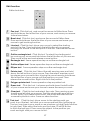
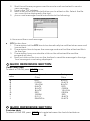
Edit graphic buttons
Functions of buttons are described below.
SAVE the current graphic displayed in the "Graphic" window.
Graphic will be saved in the "Library".
DELETE a graphic from the "Library".
INSERT the current graphic in the "Graphic" window into your
message.
16