1
1
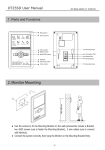
1. Parts and Functions
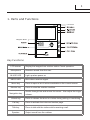
LCD Screen
Navigation Button
Key Functions
LCD screen
Display the images from outdoor station.Touch operation.
Microphone
Receives sound from the user.
IN-USE LED
Light up when power on
MESG LED
Blink when receives signal
Menu key
Monitor key
Press to open a list of actions available on the current screen.
Press to view the outside condition.
Navigation key
Scrolls through lists and moves the cursor . Also adjust the ringer
volume.
Unlock key
Press to release the door for visitors during talking or monitoring.
Call key
Press to activate the intercom function page.
Talk key
Press to talk with the visitors while receiving a call.
Speaker
Output sound from the outdoor.