1
Module 1: Stand-Alone Lab: Configuring Router Interfaces
Command
Description
show interfaces [type number]
displays statistics for all interfaces configured on the
router
displays IP information for an interface
displays a brief summary of interface status and
configuration
displays the active configuration file
show ip interface
show ip interface brief
show running-config
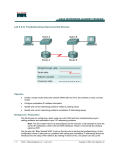
The IP addresses and subnet masks used in this lab are shown in the table below:
IP Addresses
Device
Interface
IP Address
Subnet Mask
Router1
Serial 0/0/0
10.1.1.1
255.255.255.0
Router2
Serial 0/0/0
Serial 0/0/1
Serial 0/0/0
10.1.1.2
172.16.10.2
172.16.10.1
255.255.255.0
255.255.255.0
255.255.255.0
Router3
Lab Tasks
Task 1: Load the Initial Network Configuration
Make sure that the correct topology and configuration files for this lab are loaded. This will occur
automatically when you load this lab by using the Lab Navigator.
Task 2: Enable Router Interfaces
1.
On Router1, issue the commands necessary to enter global configuration mode and configure a host
name of Router1.
Router>enable
Router#configure terminal
Router(config)#hostname Router1
2. Enter interface configuration mode for the Serial 0/0/0 interface.
Router1(config)#interface serial 0/0/0
© 2012 Boson Software, LLC
11