1
Chapter 18. Managing software
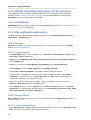
New Software Versions Require Reloading
If a piece of software is in use when you update it, the old version remains active until the
application or service is restarted. Kernel updates take effect when you reboot the system.
Kernel Packages
Kernel packages remain on the system after they have been superseded by newer versions. This
enables you to boot your system with an older kernel if an error occurs with the current kernel. To
minimize maintenance, yum automatically removes obsolete kernel packages from your system,
retaining only the current kernel and the previous version.
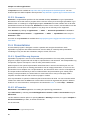
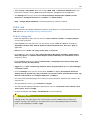
To update all of the packages in the package group PackageGroup, enter the command: su -c
'yum groupupdate "PackageGroup"' Enter the password for the root account when prompted.
Updating the Entire System
To update all of the packages on your Fedora system, use the command: su -c 'yum
update' Enter the password for the root account when prompted.
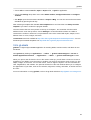
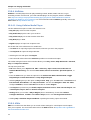
18.3.3. Removing software with Yum
Data and Configuration File Retention
The removal process leaves user data in place but may remove configuration files in some cases.
If a package removal does not include the configuration file, and you reinstall the package later, it
may reuse the old configuration file.
To remove software, Yum examines your system for both the specified software, and any software
which claims it as a dependency. The transaction to remove the software deletes both the software
and the dependencies.
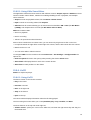
To remove the generic package my-package from your system, use the command: su -c 'yum
remove my-package' Enter the password for the root account when prompted.
To remove all of the packages in the package group PackageGroup, enter the command: su -c
'yum groupremove "PackageGroup"' Enter the password for the root account when prompted.
96