1
Medivisor for i2 Series
Contents
Software License Agreement.................................................................................3
1. Introduction..........................................................................................................8
1.1 Overview........................................................................................................8
1.2 Package contents..........................................................................................8
1.3 Operating environment..................................................................................8
2. Installation...........................................................................................................9
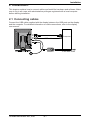
2.1 Connecting cables.........................................................................................9
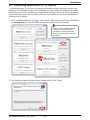
2.2 Installing the calibration sensor driver..........................................................10
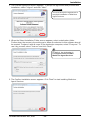
2.3 Installing Medivisor for i2 Series..................................................................11
3. Setup — Medivisor Agent Services.................................................................16
3.1 Workstation...................................................................................................16
3.2 Display..........................................................................................................16
3.3 Display Model...............................................................................................19
3.4 Sensor..........................................................................................................19
3.5 Management Station....................................................................................19
4. Auto Adjustment................................................................................................20
4.1 Calibration/Front Sensor Calibration............................................................21
4.2 Uniformity adjustment..................................................................................26
5. Useful Functions...............................................................................................29
5.1 Test Patterns................................................................................................30
5.2 Manual Adjustment......................................................................................30
5.3 Display Inspection........................................................................................31
5.4 Display Configuration...................................................................................34
5.5 Clearing the uniformity adjustment settings ................................................35
5.6 Calibration History . .....................................................................................36
6. Uninstallation.....................................................................................................38
7. Troubleshooting................................................................................................38
8. Appendix............................................................................................................39
8.1 How to attach the calibration sensor............................................................39
8.2 Gamma........................................................................................................40
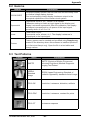
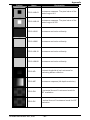
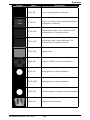
8.3 Test Patterns................................................................................................40
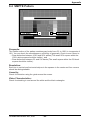
8.4 SMPTE Pattern............................................................................................44
8.5 How to read the graphs................................................................................45
http://www.totoku.com/display/
Copyright (C) 2000-2008 TOTOKU Electric Co., Ltd. All rights reserved.
TOTOKU ELECTRIC CO., LTD.
-2-