1
Contents
1. Introduction....................................................................................................................................... 119
1.1
Welcome To CD Shopping Cart TM 1.0.................................................................................... 119
1.2
What is CD Shopping CartTM 1.0?.......................................................................................... 119
1.3
End User License Agreement................................................................................................ 119
1.4
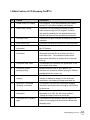
Main Features of CD Shopping CartTM 1.0............................................................................. 123
1.5
Process of Creating a Catalog CD with CD Shopping CartTM Function................................... 124
2. Getting Started.................................................................................................................................
2.1
System Requirements...........................................................................................................
2.2
Installation...........................................................................................................................
2.3
Starting and Closing the Program........................................................................................
125
125
125
126
3. Creating a Catalog CD.....................................................................................................................
3.1
Creating a FlipBook Catalog................................................................................................
3.2
Rearrange Your Pages.........................................................................................................
3.3
Add Annotation....................................................................................................................
3.4
Bookmark Important Pages...................................................................................................
3.5
Saving a New FlipBook........................................................................................................
3.6
Adding the CD Shopping Cart TM Function............................................................................
3.7
Exporting Catalog to CD......................................................................................................
127
127
128
128
128
129
129
129
4. Creating the Catalog CD with Shopping Cart Function...................................................................
4.1
Customising Your Shopping Cart Setup...............................................................................
4.2
Shopping Cart Setup - Merchant.........................................................................................
4.3
Shopping Cart Setup - Customer..........................................................................................
4.4
Shopping Cart Setup - Order................................................................................................
4.5
Shopping Cart Setup - Packaging........................................................................................
4.5.1 Adding Packaging...................................................................................................
4.5.2 Applying Packaging to Catalog Items.....................................................................
4.5.3 No Packaging in Setup...........................................................................................
4.6
Shopping Cart Setup - Additional Charges..........................................................................
4.7
Shopping Cart Setup - Load and Save................................................................................
4.8
Customizing Your Price Information.....................................................................................
4.8.1 Customizing Price Information in Packaging Setup................................................
4.8.2 Customizing Price Information Page by Page........................................................
4.8.3 Creating a Price Information List............................................................................
4.8.4 Removing a Shopping Page Setting......................................................................
4.9
Creating the Catalog CD......................................................................................................
130
130
130
131
132
134
134
134
135
135
137
138
138
138
140
144
144
5. Shopping Cart Scenarios................................................................................................................. 145
5.1
Scenario One - Similar Product With Similar Packaging....................................................... 145
5.2
Scenario Two - Similar Product(s) With Different Packaging................................................. 146
5.3
Scenario Three - Different Products With Different Packaging............................................... 147
5.4
Scenario Four - Multiple Products Per Page With Different Packaging................................. 148
5.5
Payment Options.................................................................................................................. 149
5.5.1 Scenario Five - Using the PayPal® Payment Option............................................. 149
6. The Customer’s Experience.............................................................................................................
6.1
How Your Customers Make the Orders...................................................................................
6.2
Additional Charges/Merchant Information............................................................................
6.3
Check Out............................................................................................................................
6.3.1 Email Order.............................................................................................................
6.3.2 Print Fax Order........................................................................................................
150
150
151
152
152
152