1
2.2 Attention items of installation
●The UPS installation environment must be with good ventilation, away from water, flammable gases and
corrosive entities.
●Do not lie down the UPS against the wall so that front and side panel air intake hole, rear panel air outtake
hole will be unobstructed.
●The peripheral environment temperature around the UPS should be within 0 ℃ ~ 40 ℃.
● If dismantling the machine at low temperatures, there may be condensation droplets, users can not install
or operate it before UPS completely got dry both inside and outside, otherwise there will be danger of
electric shock.
● Place the UPS near the mains socket to cut off AC mains without any delay at any emergent case.
Attention:
●Make sure the load behind the UPS is off when users connect the load to UPS, and then turn on the load
one by one later.
●Please connect the UPS with the socket which is over-current protected. Do not connect the UPS with the
socket which rated current is less than the Maximum input current of the UPS.
●All the power socket should be configured with earthling device for safety.
●UPS could be electrified or powered no matter the input power cable is tied or not, even when the UPS is off.
The only way to cut off the output is switching off the UPS and disconnecting the mains power supply.
●For all standard type UPS, it is advised to charge the battery over 8 hours before used. Once the AC mains
power energizes the UPS, it will automatically charge the battery. Without prior charging, UPS output
remains as usual but with shorter back-up time than normal.
●When connected to motor, display equipment, laser printer etc, UPS power selection should be based on
the startup power of the load which is usually twice as rated power.
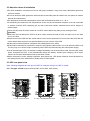
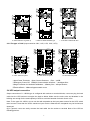
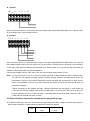
2.3 UPS rear panel view
Note: following diagrams take the type of 0.9PF for example, the type of 0.8PF is similar.
2.3.1 The type of 220V (output could be 208V, 210V, 220V, 230V, 240V)
7
6
7
6
RS232
RS232
OUT
IN
OUT
IN
8
8
TEL/MODEM/FAX
TEL/MODEM/FAX
6
5
4
USB
7
RS232
EPO
EPO
USB
OUT
IN
4
USB
4
5
EPO
5
8
3
TEL/MODEM/FAX
10
10
3
10
2
FUSE 250VAC RESET
1
9
2
OUTPUT SOCKET
2
OUTPUT
OUTPUT SOCKET
FUSE 250VAC
RESET
FUSE 250VAC
RESET
1
9
1
9
INPUT
+
INPUT
36VDC 30A
EXT.BATTERY
-
a. 0.9PF 1KVA rear panel
+
INPUT
72VDC 30A
EXT.BATTERY
-
b. 0.9PF 1.5KVA&2KVA rear panel
1
+
96VDC 30A
EXT.BATTERY
-
c. 0.9PF 3KVA rear panel