1
6) START UP
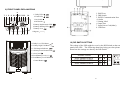
1. Connect the UPS to the wall receptacle and wait app. 5-6 sec , amber
color LED should flash indicating the charging.
2. Push the “On” Switch on the front panel of the UPS until Buzzer
sounds, then release it.
3. The LCD Display lights up along with an LED. If Utility is normal,
the UPS will run under Utility mode (Green LED). On the contrary,
the UPS will run under Backup mode (Solid Amber LED) and the
buzzer alarms every 2 seconds in case of blackout or over/under
voltage.
Caution:
1. The UPS “On” will not be executed if the above procedure is not
done completely, which means the buzzer will be heard.
2. The UPS will remain at “NO” output, if the start-up operation is
not proceeded properly even though the Input Power Cord is
connected to the wall receptacle.
IMPORTANT NOTICE:
Plug the UPS into the wall receptacle to charge the UPS for over 8
hours after initial installation
STORAGE:
Store at -15 to +30 °C (+5 to +86 °F), charge the UPS battery every
six months.
Store at +30 to +45 °C (+86 to +113 °F), charge the UPS battery every
three months.
7) OPERATION TEST
Turn Off the UPS
Push the “Off” Switch for at least 3 seconds to turn off the UPS. If you
press the “Off” Switch less than 3 seconds, the UPS will not execute
shutdown command due to insufficient pressing time.
5
In some occasions, the UPS will shut itself down in case of overload,
output short-circuited or battery cutoff point reached in the Backup
mode.
The UPS will automatically shut off the output and beep for 5 seconds
then completely shut itself down.
Plug-in Charge
If the Input Power Cord is connected to the wall receptacle properly
and the utility is normal, the UPS will start to charge automatically
without processing “Turn On” procedure. This is indicated by a
flashing amber color LED. You have to charge for at least 8 hours
every 3 months to avoid from battery self over-discharge naturally, if
the UPS is in an idle condition.
Auto-Restart
The UPS will automatically restart to provide energy to the output if
the utility recovers in 24 hours after battery cut. The “Backup LED”
will flash every 5 seconds under the waiting situation. On the contrary,
the UPS will not auto-restart if the Utility doesn’t recover within 24
hours. You are required to start up the UPS manually. If you don’t
need UPS auto-restart, you can turn off the UPS by proceeding the
“Turn Off” procedure.
Alarm Silence
The Alarm might be turned off by pushing the “On” Switch for
approximately 1 second in the “Backup” mode. Unless any other
warning or fault condition occurs, the alarm remains at Silence
condition once the “Alarm Silence” is turned off.
Test
Under Utility Normal condition, push the “On” Switch for 3 seconds
to execute the Battery Self-test function. In case the battery is
normal, it will enter into Battery Backup Mode for 10 seconds then
return back to Utility Mode. If the battery voltage is detected lower
than set limit, the Battery Replacement LED will blink for 5 seconds
then extinguish to stop self-test procedure. And if battery is detected
weak or dead, the Battery Replacement LED will steadily illuminate.
6