1
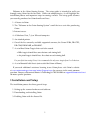
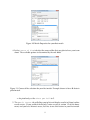
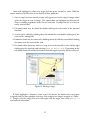
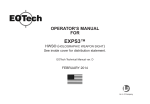
Figure 1: The C225 Reference Book and Setup Disc that comes with the Canon
DR-C225 scanner. Similar items come with the Canon P-208, DR-C240, DR-M160II and
DR-6010C.
1.1 Setting up the Scanner Software and Hardware
Carefully unpack your Canon scanner from its shipping box. Inside the box you will
find the Reference Guide and Document Scanner Setup Disc, similar to the ones
shown in Figure 1. Sometimes the setup disk will be placed inside the reference guide
book. Your scanner may come with other disks as well as the Document Scanner
Setup Disc, however these other disks may be ignored, they are not needed for Orion.
The first section in the Reference Guide book is the Setup Guide. The Setup
Guide will take you step by step on how to install your scanner’s software and setup the
hardware. Please follow these steps carefully.
1.2 Downloading and installing Orion
Orion installation files are available by download only at www.orionscoringsystem.com
A user ID and password is required to download Orion. When you purchased Orion
you received this information in a separate email titled “Welcome to the Orion Scoring
System.” Your user ID is also your Orion license number and is always numeric (e.g.
1234). Your initial password is usually 6-10 random characters.
1. Open a web browser and go to www.orionscoringsystem.com.
2. Click on the Login link in the upper right hand corner.
3. Enter your username and password. This information is in the “Welcome to the
Orion Scoring System” email that was sent to you when you purchased Orion.
4. After you have logged in, you may enable the Result Center for you club, team, or
individual use. This is an optional but recommended step, especially for clubs and
teams.
(a) Click on Result Center Settings.
(b) Check the Enable Orion Result Center checkbox.
2