1
Full-color Copy System
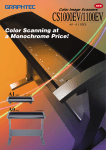
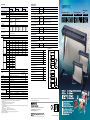
Scans thick medium up to 20.3 mm (0.8 inch)
Supports a new paper pressure feeding mechanism that can
"Iron out" the wrinkles on paper and ensure
reliable paper feeding
Scanning Arts, new age of software provides a userfriendly interface with intuitive navigation.
Equipped with sliding paper guides with a right-left balancing function
All series now have as standard the sliding paper guides
with a right-left balancing function, a very useful
mechanism when loading medium, and has proved very
popular among many users.
Full Color Image Scanners
CS500-11eN PRO
CS500-11eN
8-bit Color Image Scanners
IS200-11eN PRO
Graphic Arts
Reprographics
Photographics
CS50011PRO
Corporate Graphics
Digital Printing
CS600-11
CS500-11
Mapping
Pre-Press
GIS
Full Color Image Scanners
CS600-11eN PRO
CS600-11eN
IS200-11PRO
Architecture
Engineering
CAD / GIS
IS200-11
Monochrome
8-Bit Color
Scanning Master series is a driver/utility software for scanning, displaying, and editing image
data from a scanner. Scanning Master series consists of two versions: one is Scanning Master
21+ that is standard with all our scanners, and the other Scanning Master Pro Color that is
available as an option. Scanning Master software allows you to edit and improve the scanned
images according to your needs, it enables you to easily edit and manage your images
immediately after purchase.
Features
● Improved
CS600-11PRO
※The CS600/CS500/IS200 series can be upgraded after an initial
purchase.
These services are the option plans in a distributor. Please ask
the distributor for details.
※In the figure above, a scanning sample is loaded with its printed
side facing up for clarification purposes. Note that the printed
side must face downwards when you load the medium during
actual operations.
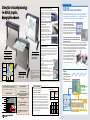
“Scanning Arts”software provides improved visibility for
scanned image using an enlarged preview. The operator simply
follows the menus on the setting area sequentially using the
intuitive interface. The control buttons are designed similar to an
office photocopier. These improvements provide a clear, easyto-understand user interface even for the novice.
The Scanning Arts Software offers full-color copying, scanning
and data transmission of large-size drawings and photographs
for support of your tasks.
Scanning Master 21+ Driver
IS200-11eN
Scanning Arts Software
The Scanning Arts Software was designed for full color copies of large-size drawings
and photographs with a user-friendly interface for ease of use. This software can also be
used for simple document scanning, file creation and data transfer via email.
CS 600/500 and IS200 adopt a new paper pressure
feeding mechanism, which helps smooth out even the
badly wrinkled paper and ensure optimal image
reproduction. Thick medium can be securely held to
guarantee correct feeding, resulting in accurate scanning.
Monochrome Image Scanners
EIS150
CS600 Series supports the ITA (Intelligent Thickness Adjustment) feature, allowing for scanning
of thick medium up to 20.3 mm (0.8 inch). To load a medium using the ITA feature while
automatically detecting its thickness, first press the ITA
button to activate the function. Then gently push the top
edge of the medium against the top cover, which allows the
cover to rise up. After loading the medium, the cover
closes to place it in position.
ease-of-use with comprehensive scanning setting functions
(Pro Color has incorporated new useful features including four-point
skew correction.)
● Improved productivity with an enhanced Scanner driver/utility software
● Scanning functions for sharp input
● Threshold value adjustment function
● Wide range of editing functions (Pro Color includes new editing
features such as area filling and image synthesis.)
● Supports a wide range of file formats (Bitmap, TIFF, PCX, JPEG, PDF
and more formats)
● Supports an easy filing feature (Pro Color only) (A filing tool with a
simple and easy search function that produces thumbnails)
The Scanning Arts Software fulfills all your needs such as large-format color copier, scan a large-size document and
transmit the data to a remote location without complicated procedures, or digitalize information from paper documents.
The software includes default scanning settings that are optimized for most types of source documents for example
drawings, posters, maps, photos etc. Any one of these settings can be chosen as needed. The Scanning Arts
Software also provides the user programming feature, allowing the user to specify preferred settings. For full-color
copying, more precise color reproduction is achieved by using
improved color matching algorithm between the input device and
the output device. Scanned data can be sent to a remote
location via email using G-Flash, a data splitting/sending
software program. With large files, you can use G-Flash to split
the file for transmission. The receiving user uses G-Flash
Receiver*1 to automatically restore the split data.
*1
G-Flash Receiver is to be downloaded from Graphtec’s website.
Features
Simple copy function
Versatile input and output functions
Professional-level color adjustment
functions
Faithful reproduction of document;
Copies that are better than the original
24-Bit Color
fun
Copy
ction
fun
S ca n
ction
il fu
Ema
nctio
n
t fu
Prin
nctio
n
Setup Area
Scans thick medium up to 20.3 mm (0.8 inch)
Compact & Lightweight
CIS vs CCD scanner
Compatible with CS600 Series that supports the ITA (Intelligent Thickness Adjustment)
feature to automatically detect the thickness of the medium being loaded
±0.1% Scanning Accuracy
Graphtec
CS500-11
Graphtec
CS500-11
24Bit Color
600 dpi Optical Resolution
4800 dpi maximum interpolated resolution
High Quality Mode
(PRO models)
Normal Mode
High Speed Mode
Reduces a total scanning time by
high-speed interfaces
High Quality Mode
Normal Mode
USB2.0/IEEE1394 and USB2.0/Network Connectivity interfaces are supported.
High Speed Mode
C company
Plus
Monochrome
High scanning speeds
Normal Mode
Scanning Master 21+ Scanner Driver
Turbo Mode
0
10
20
30
40
50
Scanning Speed (Second)
60
70
80
Scan to File / Scan to Print / Scan to Mail / Scan to Viewer
Scan to PDF
CIS : Contact Image Sensor Method
CCD : Magnification Optical Method
All Graphtec scanners currently use the CIS sensor system, ensuring sharp, crisp and
clear image reproduction. This technical advantage is further reinforced by a very
accurate paper feed and hold technology. Even deep wrinkles on paper can be
smoothed to provide optimal image reproduction. Graphtec scanners provide stunning
high-resolution images compared to other products in the market. Graphtec scanners
(CS600/500) achieve a wider color gamut using the CIS method instead of the older
CCD method. CS600/500 can produce high levels of precision and accuracy, as well as
a high Optical Resolution of 600dpi. These are truly state-of-the-art scanners that not
only meet the needs of industries requiring precise images such as civil engineering
drawings, city planning drawings and apparel paper patterns, but also satisfy the needs
of the graphic arts and printing industries.
Preview Area
The setting area enables
optimized setting conditions for
copy,print,scan and e-mail.
Corona Effect
CCD
CIS
1:1
Displays the image with 1 dot on
the screen representing 1 pixel
Move
Slider
6 line/mm
(300dpi)
8 line/mm
(400dpi)
10 line/mm
(500dpi)
Reduce
CIS
CCD
Preview
Displays the
scanned-in image
Enlarge
Enlarge Area
Enlarges the display of
the specified area
Common Area
Exits the Scanning
Arts program
Displays the Select
Mode window
Confirms the scanner
connection
Reprints the last
copied data
Common Area
Fit
Save
Saves the image
Displays the Help
window
Displays the Setup
window
Confirms the
printer connection
Scanning Arts — Main Window —
Specifies the
number of copies
The Execute button
for each mode:
Copy
Print
Scan
Send
Cancel