1
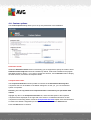
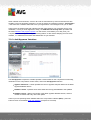
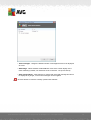
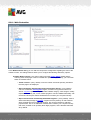
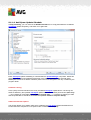
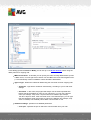
Scanning parameters - in the list of scanning parameters you can switch on/off specific
parameters as needed:
o Automatically heal/remove infection (on by default) - if a virus is identified during
scanning it can be healed automatically if a cure is available. If the infected file
cannot be healed automatically, the infected object will be moved to the Virus Vault.
o Report Potentially Unwanted Programs and Spyware threats (on by default) check to activate the Anti-Spyware engine, and scan for spyware as well as for
viruses. Spyware represents a questionable malware category: even though it usually
represents a security risk, some of these programs can be installed intentionally. We
recommend to keep this feature activated as it increases your computer security.
o Report enhanced set of Potentially Unwanted Programs (off by default) - mark to
detect extended package of spyware: programs that are perfectly ok and harmless
when acquired from the manufacturer directly, but can be misused for malicious
purposes later. This is an additional measure that increases your computer security
even more, however it can possibly block legal programs, and is therefore switched
off by default.
o Scan for Tracking Cookies (off by default) - this parameter of the Anti-Spyware
component defines that cookies should be detected; (HTTP cook ies are used for
authenticating, track ing, and maintaining specific information about users, such as
site preferences or the contents of their electronic shopping carts).
o Scan inside archives (on by default) - this parameters defines that scanning should
check all files stored inside archives, e.g. ZIP, RAR, ...
o Use Heuristics (off by default) - heuristic analysis (dynamic emulation of the
scanned object’s instructions in a virtual computer environment) will be one of the
A V G I nternet Sec urity 2 0 1 1 © 2 0 1 1 C opyright A V G T ec hnologies C Z, s .r.o. A ll rights res erved.
160