1
Program Points & Department Details...
New .NET Features
When sending a refund check request to Accounts Payable, the
process will now automatically add the parcel number to the
Notes field in the Accounts Payable interface window.
Legislation Changes
The June 2, 2014 update contains program changes in both
Pervasive and .NET Tax to accommodate legislation changes for
Qualified Forest Parcels. These parcels are exempt from school
operating in circumstances where there is not a structure on
the parcel. In the case where there is a structure, the taxable
value of the structure is not exempt from the school operating
mills.
The Qual Forest PA 42 Bldg TV setting is stored in the
Miscellaneous Fields area of the program. Please visit http://
www.bsasoftware.com/References/WhitePapers_HelpDocs/
Help%20Docs%20-%20Tax%20Suite/QualForest.pdf for a
help doc outlining the areas of the program affected by this
legislation.
Looking Ahead
- A County User Group is planned for October 10, 2014 at
our training facility in Bath, Michigan. We will provide more
information as we get closer.
- Entering your sales information after the Foreclosure
Sale is easy with Quick Data Entry (Utilities>Quick
Data Entry>Property Sale Utility). This will load all the
foreclosed parcels and allow you to quickly enter all your
sales information without having to search the database
for each record. Once you’ve completed the data entry,
the Foreclosure Chargeback Spread Report (located in
Reports>Foreclosure Reports) will provide information to
determine the chargebacks to each unit.
Drain Assessment
Thank you for attending the Drain Assessment User Group
in April. We had a great group and were able to thoroughly
review the processes and program features that matter to you.
A video of the session will be available on our website in the
near future. We value your input and look forward to continually
improving our applications to suit your needs.
Looking Ahead
- As you prepare new Drain Assessment Rolls
for the Winter 2014 billing, we recommend not
committing rolls until you are sure you have
everything completed. Once you do commit a
roll you can still do splits and update names
and addresses; however, you will not be able to
change values or amounts due without a tech
support password. We recommend you run
your Roll Reports both before you commit and
after, to be certain your totals are correct.
These parcels should be charged a 2.00 mill service fee,
ideally in the season in which you levy school operating tax.
In order to select the proper season in which to apply this
fee, go to Taxes Setup>Calculation Options>Apply Qualified
Forest Exemption. If you have Qualified Forest parcels and they
are not being billed correctly, please contact Tax Support for
assistance.
Delinquent Personal Property
Delinquent Tax
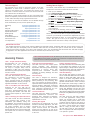
2. Click the Pay Selected Years button and enter the Check
Number (or C for “cash”).
New Feature Highlight
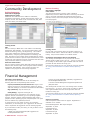
During settlement, you may have noticed a change to the
export from Tax to County Delinquent. We added a feature in
the export allowing users to set the interest/penalty export
options during the export process. This eliminates the need
to close the export, change the options, then start the export
over again. It is extremely important to set this option
appropriately, as it will determine the amount of summer and/
or village interest to be included in the base tax being exported
to the Delinquent program. The Delinquent Interest options
are: “Use Currently Charged Interest/Penalty,” which requires
you to select if you want to include Interest only or Interest
and Penalty. The second option is to “Prompt for Interest to
Charge,” which will then prompt you to enter a percentage to
charge (typically a flat 6%).
Tips and Tricks
When taking payments directly in Delinquent Personal Property,
specifically to pay multiple years for one parcel, use the batch
payment method.
1. Check the Pay boxes of the years for which you are
accepting a payment.
3. Enter the Batch Number.
4. Verify the Received Of information (click the button to
view/edit).
5. Click the Pay button.
3rd Quarter 2014 BS&A Software 3