1
G-Link2®-LXRS® Wireless Accelerometer Node User Manual
3.4
System Operational Overview
Connect to Nodes
Several methods can be used in Node Commander® to establish communication with the
nodes. This quick start section covers the two simplest methods; adding a node by address and
by using the node discovery feature.
3.4.1
Adding a Node by Address
Adding a node by address requires the node to be on the same communication frequency
as the gateway. The node address and frequency are indicated in the documentation
included with the node when it is purchased.
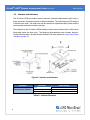
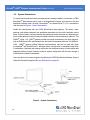
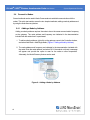
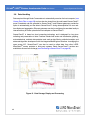
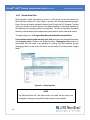
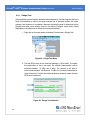
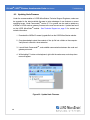
1. To add a node by address, right-click on the gateway name in the Controller window,
and select Add Node > Add Single Node (Figure 6 - Adding a Node by Address).
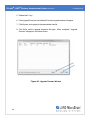
2. The node address and frequency are indicated in the documentation included with
the node. Enter the node address, and select OK. If the node is not found, a message
will appear and provide the option to scan for the node on other frequencies.
Alternately, the Node Discovery feature can be used.
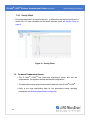
Figure 6 - Adding a Node by Address
15