1
Cloud Sensor User’s Manual
2. Introduction
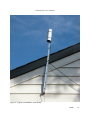
The Cloud Sensor senses how clear the sky is, measures the ambient air temperature, and detects wetness
(snow and rain). It must be mounted out of doors in a location that provides a clear view of the sky. A
cable runs from the sensor unit to the indoors, and connects to the supplied adaptor box. This adaptor box
has a wall plug power supply connector, a DB-9 serial port for connection to a computer, and another
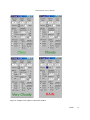
connector which is used to request an emergency dome closure. The supplied “Clarity” software operates
with Windows 98 and later, and provides a visible and audible interface. It has a single line file and a
COM (ActiveX) interface to allow the Cloud Sensor to input to observatory automation software.
Here are some of the intended uses of the Cloud Sensor and Clarity software:
a.
b.
c.
d.
e.
f.
g.
Identify sky conditions before starting an observing session or opening a remote observatory;
Warn the user who is indoors, when the skies become clear so the user knows that observing
could start or resume;
Warn the user that conditions have changed from clear to cloudy and that further imaging will
not succeed;
Warn the user that conditions have become very cloudy and that the observatory should be
closed soon;
Warn the user that conditions have become wet and the observatory should be closed
immediately;
Automatically close an observatory when conditions become very cloudy or wet, even if the
user is not at the computer to see the warning, or the computer is not functioning;
Provide the Cloud Sensor’s data via a COM (ActiveX) or file interface, to other software.
3. Operating Principles
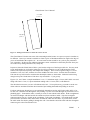
The Cloud Sensor detects the presence of clouds in an indirect manner. What it really does is measure the
sky temperature by sensing the infrared radiation from the sky in the 8 to 14 micron wavelength range. It
uses a thermopile to do this. It then compares this reading to the ambient temperature at the bottom of the
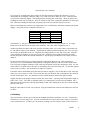
Cloud Sensor Unit. A clear sky is at least 20°C (36°F) colder than the ambient temperature near the
ground. A fully overcast sky with low clouds (the kind that rain usually comes from) usually will be
close to the same temperature as the ambient temperature.
Very high thin clouds composed of ice crystals (cirrus) are by nature quite cold and therefore may not be
detected by the Cloud Sensor. Unfortunately, this might fool you into thinking that you can observe when
you cannot. This might waste a bit of your time but on the positive side these clouds do not contain rain.
There are some unusual meteorological situations where rain clouds can be high above ground and
therefore cold. If so there will be a warning only after the rain begins to fall.
While these limitations due to the physics of the atmosphere are unfortunate, you should find the Cloud
Sensor a very useful adjunct to your astronomic al observing, just as we do.
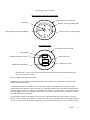
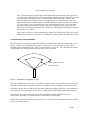
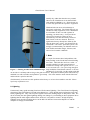
The thermopile for measuring sky temperature is inside the little round can (a TO-5 transistor case
actually) on the sky end of the Cloud Sensor Unit. You can see the filter aperture that lets the infrared
radiation enter the device. This device also contains a thermistor which is used to measure the
temperature of the case around the thermopile. At the other end of the Cloud Sensor Unit, near the cable
connector, is a thermistor which measures the ambient temperature. The Cloud Sensor Unit should be
V004G
3