1
INTERFACE OVERVIEW
Using Realterm to Establish a Remote Connection
Background
Realterm is a terminal program that can used to
communicate with a device attached to the
serial port of a PC or via an emulated serial port
via USB.
The following instructions apply to version
1.99.0.27. Even though Realterm is used as an
example to establish a remote connection, any
terminal program can be used that has similar
functionality.
Note
Realterm can be downloaded on Sourceforge.net
free of charge.
For more information please see
http://realterm.sourceforge.net/
Operation
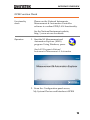
1. Download Realterm and install according to the
instructions on the Realterm website.
2. Connect the PEL-3000 via USB (page 5) or via
RS232 (page 7).
3. If using RS232, make note of the configured
baud rate, stop bits and parity.
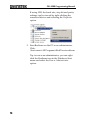
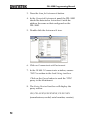
4. Go to the Windows device manager and find
the COM port number for the connection.
For example, go to the Start menu > Control
Panel > Device Manager
Double click the Ports icon to reveal the
connected serial port devices and the COM port
for the each connected device.
9