1
General description
MTReport 4.0 is a software utility for analysing report files generated by MetaTrader.
MetaTrader is a Windows application by MetaQuotes Software Corporation, a company that develops
and implements professional, high quality online trading platforms for automated online brokerage
services in Forex, CFD, and Futures markets (www.metaquotes.net).
After a period of trading with MetaTrader, either on a demo or a live account, a trading statement can
be generated by MetaTrader. The statement is called a report and it is saved in HTML format, so it can
be viewed in browsers like IE or FireFox. Since the report is just a list of trades, it is not always easy to
assess the merits of your trading strategy just by looking at the trade list. For instance, when you are
trading multiple currencies, the trades on one currency pair may have been profitable, while trading
another pair may have resulted in a loss. It is not easy to find this kind of information in the report.
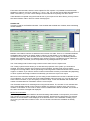
With MTReport 4.0 it is possible to load the report and analyse the information it contains. It will
display information in various forms, using the currency pairs you select with a single mouse click.
Installing MTReport 4.0
Installing MTReport 4.0 is easy. Just download the setup program from www.mt4tools.com. This setup
program will install MTReport 4.0 for you. Shortcuts will be created on your desktop and in your start
menu, so it will be easy to start the program.
Generating a report with MetaTrader
MTReport 4.0 works with reports generated by MetaTrader versions 3 or 4. The MetaTrader client has
a section called Terminal, which is on the bottom of the MetaTrader window. In the Terminal window,
click the tab Account History to display a list of closed trades.
With MetaTrader 4 it is possible to sort the trade list by clicking the header of the trade list. Trades will
be sorted depending on the column you click. The generated report will be in the same order as
displayed on the screen. By default, trades are sorted on closing date/time.
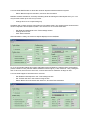
If you want to view comments, commissions, or taxes (MetaTrader 4), right-click the trade list and
check the appropriate option. Magic numbers in MetaTrader 4 will be entered in the report when the
Comments option is checked.
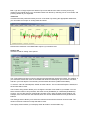
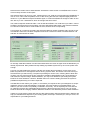
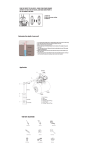
Right-click the trade list, and select the period you want to use. You
can select All History to see all trades, but you can also specify a
period like Last Month.
Generating a report
Right-click again, and select Save as report. Select the name and
location of the file you want to use for your report and click Save.
The default extension for the report file is .htm. It may happen that
MetaTrader opens your default web browser to display the report.
You may ignore this.
It is also possible to create a detailed report, which contains more
information, including a graph of the balance. MTReport 4.0
accepts both normal and detailed reports. For analysis it will make
no difference which format you use.