1
Frequently asked questions
with answers…
After starting MTReport 4.0 a message appears: Cannot connect to internet...
MTReport 4.0 needs to connect to the authorisation server to check if you are registered or running in
trial mode. If it cannot connect to the authorisation server, MTReport will exit.
In the summary, the return and drawdown percentages are missing…
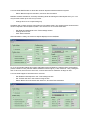
This is because there is no deposit in the report, so the initial balance is unknown. Select the Options
tab, check Initial deposit, and enter the deposit manually.
What are ‘per lot’ pips…
The pips (per lot) in the summary are calculated by subtracting the open and close prices from the
trades, and do not depend on the number of lots traded.
After starting MTReport 4.0 a message appears: Software has been compromised…
The MTReport executable has been altered, possibly by a virus. Please use you virus checker, and
download the original software from the website www.mt4tools.com. If you have registered MTReport,
your license will still be valid.
After starting MTReport 4.0 a message appears: Not enough rights to create or delete file…
MTReport 4.0 uses temporary files that are stored in the directory where the program resides. Make
sure you have rights to create, write, and delete files.
My report will not load, or will not load correctly…
Make sure the report is generated directly by MetaTrader. Do not use Word or any html-editor to
change the report. It is not possible to load the daily or monthly reports send by your broker. If you
think you have found an error in MTReport, please send the statement to support@mt4tools.com.
Make sure to attach the statement as a separate file to your email.
Some reports take a long time to load…
Most reports load within seconds. However, reports with thousands of trades can take some time.
Keep in mind that MetaTrader never intended their reports to be processed like MTReport 4.0 does.
Especially StrategyTester can take a long time to load, because every trade is described in at least
two lines, one for opening the trade, one for closing, and possibly several lines to change the exit
criteria. All these lines have to be combined into one. When your report contains several thousands of
trades, this will take some time.
When adding StrategyTester reports, some of the order numbers are changed…
Order numbers from StrategyTester always start with one. When combining reports, the numbers have
to be made unique for the software to function properly.
My computer crashed and I had to install Windows again, but now MTReport is in trial mode…
Sorry to hear your computer crashed. Please go to the Support section on www.mt4tools.com to
request a new activation code. After entering you email address, you will receive a message with
further instructions. Since this is an automated process, you should be up and running within minutes.
Please note an activation code request will only work if you have purchased MTReport 4.0 in the past.
When loading a report, an error ‘Please use ascending ticket numbers’ is displayed…
Make sure that the StrategyTester results in MetaTrader have ascending ticket numers. In
MetaTrader, click on the # on the top bar of the results list to select either ascending or descending
order.
If have another problem / question / suggestion…
Please let me know at support@mt4tools.com.