1
sophisticated and dynamic behaviors of graphical objects in a
simple and straightforward manner.
CGLIB can be used in many areas such as drawing editors,
interactive user interfaces, document authoring, animation,
information visualization, intelligent agents, and games. In this
paper, we describe the library and present several sample
applications.
Familiarity with logic and constraint programming concepts is
assumed, but most of the material should be readable for readers
who don’t have any programming experience in Prolog or CLP.
The reader is referred to [3] for the basics.
2. THE CGLIB
2.1 An Illustrative Example
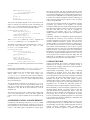
Let us start with the following program:
go:cgButton(B),
B^text #= “Hello World”,
handleButtonClick(B),
cgShow(B).
handleButtonClick(B),
{actionPerformed(B)}
=>
halt.
(1)
(2)
(3)
(4)
(5)
(6)
(7)
(8)
The call cgButton(B) in line (1) creates a button B. The
constraint in line (2) binds the text attribute of B to “Hello
World”. Line (3) creates an event handler, which will be
activated when the button B is clicked. The call cgShow(B) in
line 4 packs the button, i.e., determines the size and position of
the button, and shows the button in the default window. In our
example, nothing is mentioned about the color and font of the
text, the size of the button and the position of the button in the
window. The system determines the attribute values for us either
by using the constraints we provided or by using the default
values. The action rule in lines 5-8 defines the event handler
handleButtonClick(B). The term enclosed in the pair of
braces, actionPerformed(B), is called an event, and the
right hand side of the rule, halt, is called an action. When an
event actionPerformed(B)is posted, i.e, when the button B
is clicked, the program terminates. In general, an action can be
any sequence of sub-goals.
2.2 Objects
The library supports the creation and manipulation of a rich class
of objects including arcs, buttons, check boxes, circles, choices,
images, labels, lines, lists, ovals, polygons, rectangles, round
rectangles, squares, stars, text areas, text fields, text boxes, and
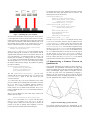
triangles (See Figure 1).
For each type of objects, there is a primitive for creating objects
of the type. For instance, the call cgButton(B) in our
illustrative example creates a button. The primitive can also be
used to create a list of objects. For example, the call
cgButton([B1,B2,B3]) creates three buttons.
Figure 1. Base objects.
Each object has a certain number of attributes and each attribute
has a name and a domain. The attribute attr of an object O is
referred to by the notation O^attr. The more commonly used
notation O.attr cannot be used here since the ‘.’ has been used
as the constructor for lists in Prolog.
Each object has the following attributes:
•
window: The containing window of the object.
•
x: The x-coordinate of the top-left corner of the
object.
•
y: The y-coordinate of top-left corner of the object.
•
width: The width of the object.
•
height: The height of the object.
•
color: The color of the object.
These attributes are stored explicitly and are called base
attributes. In addition to the base attributes, each object also has
some derivative attributes that are not stored explicitly but are
derived from the base attributes. For example, there is a derivative
attribute called centerX in every object. When centerX of an
object O is accessed, the system replaces O^centerX with a
variable, say V, and generates a constraint
V #= O^x+O^width//2
which forces V to be the central x-coordinate of O.