1
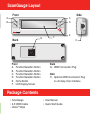
ScanGauge Layout
A
Front
Side
C
B
D
Back
G
Front
A. Function/Selection Button
B. Function/Selection Button
C. Function/Selection Button
D. Function/Selection Button
E. Home Button
F. LCD Display Screen
F
H
Back
G. OBDII Connection Plug
Side
H. Optional OBDII Connection Plug
or unit daisy chain interface
Package Contents
• ScanGauge
• 6-ft OBDII Cable
• Velcro® Strips
E
• User Manual
• Quick Start Guide