1
part 1 - erratic² quick start guide
Let's start with something simple. On the upper right of the GUI (graphical
user interface, pronounced "gooey" unfortunately, means the image of the plugin) is the "gain" control slider.
This controls the overall volume output of the plug-in, whereas each drum
pad has it's own individual volume control. This way you can compensate for
having loud of soft samples in the drum kit you're creating. For instance when I
made the "runa 3am fried kit" the samples I was using for kick drums were much
softer than the other samples, so I just turned all the other ones down and
cranked the "gain" control.
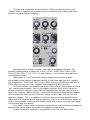
Here's a pair of very important controls that seem innocuous at first on the
middle of the top of the GUI:
Because erratic² loads your samples into your computer's RAM sometimes it
needs to be flushed out to hear the samples you just loaded. If you're hearing the
previously loaded samples instead of the ones you've added, simply hit the
"reload" button. Whether this is necessary depends on what host software you're
using.
The "all" button is very important. Each drum pad strip of controls has a
mute and a solo button. If you solo a drum pad to, for instance, hear it while
you're editing it's controls you'll need to hit "all" to hear all the drum pads again.
If you seem to mysteriously hear only one drum layer, just hit that "all" button.
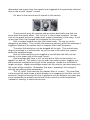
To the left of those controls are these buttons:
If your PC is bogging down from too many processes running at once and
having huge samples loaded, try using these to tone it down. erratic² can load
stereo .wav files and plays stereo files by default. If you hit the "mono" button,
which turns it blue, then the files play in mono thus halving the power needed to
play them. The "quality" drop-down box can also help free up computer power,
though I use it aesthetically - the lower you set the quality, the more the drums
sound bitcrushed. This setting does appear to get saved in a preset so you can
use it as an extra special effect.
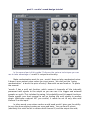
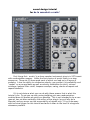
OK, let's load some samples already. Every drum pad has this strip of
controls: