1
Contents
Welcome to Qedit for Windows
1
The Ultimate Editing Tool .........................................................................................................1
System Requirements .................................................................................................................2
Getting Started
3
Installing Qedit for Windows .....................................................................................................3
Trial Users with a Production Copy of Qedit .............................................................................3
Running Qedit ............................................................................................................................4
The Application Window ...........................................................................................................4
Connecting to a Host
7
A Connection is Qedit’s Roadway .............................................................................................7
Creating a Connection ................................................................................................................7
Creating & Saving Your First File
13
Creating and Saving Files.........................................................................................................13
Opening a File ..........................................................................................................................15
Host Directories .......................................................................................................................17
A Sampling of Features
19
Scrolling Through a File ..........................................................................................................19
Fonts.........................................................................................................................................21
Colors.......................................................................................................................................22
Ruler Bar ..................................................................................................................................25
Auto-Indent ..............................................................................................................................27
Selecting Text...........................................................................................................................27
Copying, Moving and Pasting Text..........................................................................................29
Deleting Text............................................................................................................................31
Working With Rectangular Selections .....................................................................................31
Working With Columns and Tabs............................................................................................33
Switching and Tiling Files........................................................................................................36
Multiple Views.........................................................................................................................38
Searching..................................................................................................................................39
Copying Files
43
Copying Files Across Platforms with Copy and Paste .............................................................43
Copying a Host File to the Same Host with Save As................................................................44
Printing Files
45
Printing on a Local Printer .......................................................................................................45
Print Options on a Local Printer...............................................................................................46
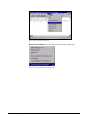
Executing Host Commands
49
Executing a Single Command ..................................................................................................49
Qedit for Windows Quick Start Guide
Welcome to Qedit for Windows • i