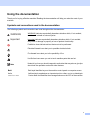
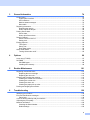
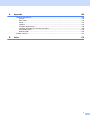
1
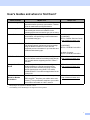
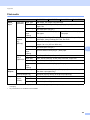
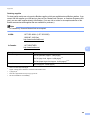
User's Guides and where to find them?
Which manual?
What's in it?
Product Safety Guide
Read this Guide first. Please read the Safety
Instructions before you set up your machine. See this
Guide for trademarks and legal limitations.
Quick Setup Guide
Follow the instructions for setting up your machine
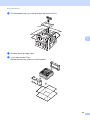
Printed / In the Box
and installing the drivers and software for the
operating system and connection type you are using.
User’s Guide
Learn the print operations, how to replace
consumables, and performing routine maintenance.
See troubleshooting tips.
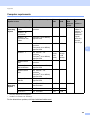
Network User's Guide This Guide provides useful information about wired
and wireless network settings and security settings
using the Brother machine. You can also find
supported protocol information for your machine and
detailed troubleshooting tips.
Where is it?
Printed / In the Box
For USA:
HL-6180DW(T)
PDF file / Brother Solutions Center
at http://solutions.brother.com/
HL-5470DW(T)
PDF file / CD-ROM / In the Box
For Other Countries:
PDF file / CD-ROM / In the Box
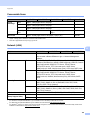
Wi-Fi Direct™ Guide
This Guide provides details on how to configure and PDF file / Brother Solutions Center
use your Brother machine for wireless printing directly at http://solutions.brother.com/
from a mobile device supporting the Wi-Fi Direct™
standard.
Google Cloud Print
Guide
This Guide provides details on how to configure your PDF file / Brother Solutions Center
Brother machine to a Google account and use
at http://solutions.brother.com/
Google Cloud Print services for printing over the
Internet from devices using Gmail™ for mobile,
GOOGLE DOCS™ for mobile and applications for the
Chrome OS.
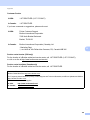
Mobile Print/Scan
Guide for Brother
iPrint&Scan
This Guide provides useful information about printing
JPEG and PDF 1 files from your mobile device and
scanning 2 from your Brother machine to your mobile
device when connected on a Wi-Fi network.
1
PDF printing is not supported on Windows® Phone.
2
HL-5470DW(T) and HL-6180DW(T) do not support the scanning feature.
PDF file / Brother Solutions Center
at http://solutions.brother.com/
i