1
Task menu
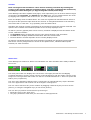
The Task menu is activated by tapping on the Status icon (obviously a touch-screen is required
for doing this). The menu provides instant access to the most important functions, even when
Swiss Manager is in the background.
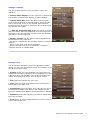
The Task menu has the following sections, from top to the bottom:
• Cleanup: Increase available memory by exiting programs. The range of the operation depends
on the selected command.
• Favorites: Displays a list of selected applications that you can configure.
• Recent: Displays a list of frequently used programs that are currently not running.
• Running: Displays a list of applications that are active in memory.
• Tools: Contains commands for icon configuration, status report, and various other tasks.
• [Date]: Switches to the main view of Swiss Manager when it is in the background, or places it
in the background if it is currently in foreground.
Programs view
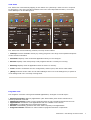
The Programs view lists running and installed applications, arranged in several topics:
• Running programs: Ordinary applications (also called Tasks) that can be switched to or
closed by the End command.
• Additional running: Further running programs that are not normally presented to the user.
• Applications: Sorted lists of all applications that are available on the device.
• Favorites: A configurable list of selected programss.
• Recent: Automatically generated list of the most frequently used applications.
• Program counters: Numbers of various kinds of programs and their components.
CellPhoneSoft – Swiss Manager Pro Documentation
3