1
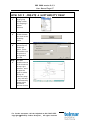
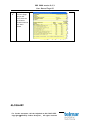
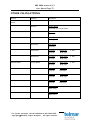
RBP 2000 version 2.0.3 User Manual Page 2 INTRODUCTION .................................................................................. 3 Main features of Telmar RBP ......................................................................................................................3 Guidelines for using Telmar RBP .................................................................................................................4 GETTING STARTED ............................................................................... 4 The options in the Start up dialog box .....................................................................................................5 START A NEW OPTIMISED CAMPAIGN ........................................................ 6 Minimum/Maximum spots booked (new) ....................................................................................................6 Set Active Daypparts (new) ........................................................................................................................7 START A NEW MANUAL CAMPAIGN ........................................................... 8 Building New Demographic Groups .............................................................................................................8 Campaign Management ................................................................................................................................ 13 Printing your Campaign ............................................................................................................................... 25 OTHER FEATURES OF RBP ...................................................................... 26 File Menu ....................................................................................................................................................... 26 Campaign Menu ............................................................................................................................................. 30 View Menu ..................................................................................................................................................... 35 Graph Menu................................................................................................................................................... 39 Report Menu ................................................................................................................................................. 42 PCA (Post Campaign Analysis) Menu ........................................................................................................ 52 J-ET Menu .................................................................................................................................................... 53 Configuration Menu ..................................................................................................................................... 54 HOW DO I …SET UP A MANUAL CAMPAIGN? ................................................ 57 HOW DO I …OPTIMISE TO 4 OTH? ........................................................... 59 HOW DO I …SAVE A STATION SELECTION? ................................................ 61 HOW DO I …SET UP AND SAVE A RATECARD FILE? ....................................... 63 HOW DO I …COPY AN EXISTING SPOTPLAN TO ANOTHER STATION? ................. 65 HOW DO I …MERGE 2 CAMPAIGNS BY DATE ................................................ 66 HOW DO I …CREATE A SUITABILITY PMAP ................................................. 67 GLOSSARY ........................................................................................ 68 OTHER CALCULATIONS ......................................................................... 70 For further assistance call the Helpdesk on 020 7467 2575 Copyright 2015 By Telmar Group Inc., All rights reserved