1
ACS-61000/61010 User’s Manual
About this manual
Congratulations on your selection of the ACS-61000/61010. The card is monitored by a Javabased RAID GUI.
INTENDED USER
This manual is designed and written for users installing and using RAID GUI. The intended
user should have working knowledge of RAID planning and data storage.
ORGANIZATION OF THE MANUAL
PART ONE:
Chapter 1:
PART TWO:
Chapter 2:
Introduction
Introduction provides an overview of the card and its features.
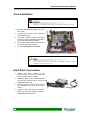
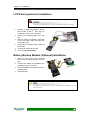
Installing the card
Setting up RAID GUI provides details of how to setting up your card and
connecting to the RAID GUI.
PART THREE: Card Configurations
Chapter 3:
PART FOUR:
Chapter 4:
PART FIVE:
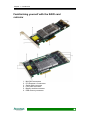
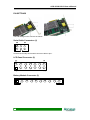
Card Connections provides details of the connectors on the RAID card.
Card BIOS and EFI
The Card BIOS and EFI allows the user to configure a RAID array without
using the RAIDGuard X GUI.
Appendices
Appendix A: Specifications lists the technical details of the ACS-61000/61010 RAID
card.
Appendix B: Contact Us lists contact details of Accusys business units around the
world.
Guide to conventions
Important information that users should be aware of is indicated with the following icons:
This icon indicates the existence of a potential hazard that could result in
personal injury, damage to your equipment or loss of data if the safety
instruction is not observed.
This icon indicates useful tips on getting the most from your RAID card.
Important terms, commands and programs are put in Boldface font.
2