1
IPCAM User Manual
Contents
1
WELCOME ................................................................................................................................- 1 1.1 Features .................................................................................................................................- 1 1.2 Packing List ..........................................................................................................................- 2 1.3 Product views........................................................................................................................- 3 1.3.1 Front View .........................................................................................................................- 3 1.3.2 Interface .....................................................................................................................- 4 -
2
1.4 PC System Requirements......................................................................................................- 4 1.5 Hardware Instruction ............................................................................................................- 4 1.6 Software installation .............................................................................................................- 5 SOFTWARE OPERATION .......................................................................................................- 7 2.1 IP Camera Tool.....................................................................................................................- 7 2.2 Camera Login......................................................................................................................- 10 2.3 For Visitor...........................................................................................................................- 11 2.4 For operator.........................................................................................................................- 12 2.5 For Administrator................................................................................................................- 13 2.5.1 Multi-Device Settings ..............................................................................................- 14 2.5.2 Network Settings......................................................................................................- 16 2.5.3 DDNS Service Settings ............................................................................................- 18 -
3
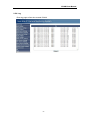
2.5.4 Mail and FTP Service...............................................................................................- 18 2.5.5 Motion Detection .....................................................................................................- 20 2.5.6 Log ...........................................................................................................................- 22 HOW TO USE ..........................................................................................................................- 23 3.1 Step by step to use...............................................................................................................- 23 3.2 Setting Wi-Fi of IP Camera ................................................................................................- 23 3.3 Connected to the Internet through ADSL directly ..............................................................- 24 3.4 Using a router to access the Internet ...................................................................................- 24 -
3.5 Static IP user .......................................................................................................................- 25 3.6 How to use DDNS ..............................................................................................................- 26 3.7 How to use mobile telephone to enter ipcam.....................................................................- 28 4 APPENDIX....................................................................................................................................- 29 4.1 Frequently Asked Questions ...............................................................................................- 29 4.1.1 I have forgotten the administrator username and/or password.................................- 29 4.1.2 IP Address configuration..........................................................................................- 29 4.1.3 Network Configuration ............................................................................................- 29 4.1.4 No pictures Problems ...............................................................................................- 29 4.1.5 Problems with network bandwidth...........................................................................- 30 4.1.6 For example: Register procedure from a DDNS web ..............................................- 30 4.1.7 Why pop-up the prompt”Fail to connect to the device…”?.....................................- 33 4.1.8 Can’t access the ipcamera in the internet? ...............................................................- 33 -
-2 -