1
����������������
The problem with how Windows CE works becomes apparent if you run out of battery power in the PL2000.
When that happens, the contents of the RAM are lost, along with all your installed programs. Most consumer
Windows CE devices allow you to perform a backup of the RAM of your device to a desktop PC. This might
be OK for a single unit and a non-professional environment, but it is not OK for the typical PL2000 solution.
To fix this problem, the IPSM program is used. It allows the part of the Flash memory not in use by the
operating system to be used by you or your system integrator. The IPSM is automatically loaded when the
PL2000 boots up, and it creates a folder named ‘Flash’ in the file system. The folder can be seen in the
screenshot in the previous section, 6.4.3 Windows Explorer. Any and all files copied into this folder reside in
Flash memory, and are therefore not lost even if the PL2000 is without power. The IPSM is more commonly
referred to as the Flash folder. There are two tools which in conjunction with this folder allow the permanent
storage of files and settings.
5.4.5
Automatic Registry Backup
When you install a program onto the PL2000, you are installing more than just files. Most Windows programs
also make modifications and additions to the Windows Registry. The Registry is a kind of catalog of settings
for all programs, including the operating system. So in order for your installed programs to work correctly
even following a power loss, the registry needs to be stored in flash. The PL2000 uses an automatic backup
system where all changes to the registry (which is in RAM) are backed up periodically. There are three ways
the registry can be backed up:
1. Cycling the power of the PL2000 using the power button. When the PL2000 is switching itself off, it
also backs up any changes to the registry to Flash.
2. Leaving the unit on for 5 minutes. Any modifications to the Registry are automatically backed up every
five minutes.
3. Running \Windows\RegBackup.exe. This program triggers a backup of the registry immediately.
For information on how to restore your PL2000 to factory default registry settings please see the section
concerning the FormatPSM tool later in this chapter.
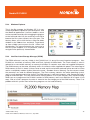
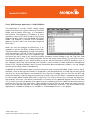
5.4.6 File System Backup Application - FSBackup
The FSBackup application allows you to back up all files in the
RAM file system of the PL2000 to flash memory. At the same time
as the backup is made a monitor file is created in the Windows
folder. Then every time the device boots up FSBackup verifies
that the file is present. If it is not, it means either that there has
been a power failure that has led to the clearing of the RAM
or that a hard reset has been made. In both cases FSBackup
proceeds to restore the backed up files to their correct places
in RAM. FSBackup is started by activating its link in the Start /
Programs / NordicID folder. The intended usage of FSBackup
©2005 Nordic ID Oy
Nordic ID PL2000 User Manual, version 2.3, July 2005
37