1
DOCKING STATION HW 50250 (STANDARD)
Connections of the Docking Station
7.
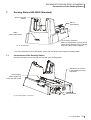
Docking Station HW 50250 (Standard)
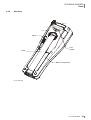
Slot for PDT with
battery
Slot for
spare battery
LEDs*
yellow-yellow-green
Fig. 57: Docking station
The red LED* shows the
battery charging status. (shines permanently during charging process, flashes
when the battery is fully charged)
* For more information on the LEDs please refer to the user guide of the respective docking station.
7.1
Connections of the Docking Station
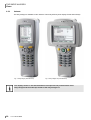
Several connections can be found at the rear side of the docking station.
USB-Device to connect
to the desktop PC using
ActiveSync
Power supply:
Power supply unit
connection HW 14200
Serial interface
Fig. 58: Docking station, connections
1.0 • 18.12.2009
71