1
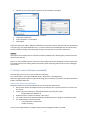
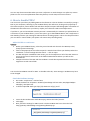
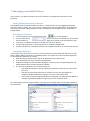
References: editing Updating author names There may be variations of an author’s name in your data. For example: Joe Cool, Joe A. Cool, J. A. Cool, etc. Since some styles prefer whole names and others abbreviated first and middle names, it is best to update names to full names and leave the work of abbreviating to the EndNote styles. But: for complex author names (Jr., II, multiple-words) always enter last name first, followed by initials: de Gaulle, Charles de la Rey, V. De Boer, J. Page numbers Page ranges can be entered as complete; the style used to create the bibliography can change the page numbers to full, abbreviated or first page. EndNote recognises the following forms; use a comma to separate non-consecutive ranges: 37-41 441-7 15-17, 19, 85-89. How to change citations in uppercase? Some online resources import citations in UPPERCASE. When you do not want these citations to appear in your Word document, you will have either to edit the references into lower case, choose a style, which converts uppercase into lower case, or edit your current style so that it will convert your references accordingly. Styles in EndNote are set up in one of three ways: 1. Leave titles as entered 2. Headline style capitalization e.g. Memory in Hearing-Impaired Children: Implications for Vocabulary Development 3. Sentence style capitalization e.g. Memory in hearing-impaired children: Implications for vocabulary development. Make sure your required style is selected in your styles box - Choose Edit - Output styles - Edit "name of style" - Your style template will open for editing. - From the left hand side of the screen choose Bibliography -Title Capitalization - (You can also choose Footnotes-Title Capitalization if you are using a footnote style) - Select your preferred option. Formatted citations and Instant Formatting Via CWYW, EndNote formats a citation in any style you want. This is called Instant Formatting. Sometimes you might want to turn Instant Formatting off, as it can be time-consuming to refresh your bibliography each time a new citation is inserted. This can be done in the EndNote tab in Word through the option Convert Citations and Bibliography > Convert to Unformatted Citations . 18