1
Manual Ver1.01
Table of Contents
1.
INTRODUCTION......................................................................................................................5
2.
INSTALLATION........................................................................................................................6
FRONT PANEL ....................................................................................................................................6
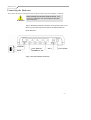
REAR PANEL......................................................................................................................................6
CONNECTING THE HARDWARE .................................................................................7
Step 1. Connect the ADSL cable and optional telephone. .............................................8
Step 2. Connect the Ethernet cable. ....................................................................................8
Step 3. Attach the power connector.....................................................................................8
Step 4. Turn on the ATU-R210 and power up your systems. ........................................8
Step 5. Configure the ATU-R210 through the WEB interface ......................................8
Step 6. Save the configurations and Reboot. ....................................................................8
3.
CONFIGURATION ...................................................................................................................9
3.1
SETUP ...................................................................................................................................9
3.2
ESTABLISH THE CONNECTION ...............................................................................................9
3.3
QUICK SETUP ......................................................................................................................12
3.3.1
PPPover Ethernet (PPPoE) Configuration ...............................................................13
3.3.1.1
3.3.1.2
3.3.1.3
3.3.1.4
ATM PVC Configuration .......................................................................................13
Connection Type and Encapsulation Mode............................................................14
PPP Username and Password.................................................................................15
Enable IGMP Multicast, and WAN service ...........................................................16
3.3.1.5 Device Setup ..........................................................................................................17
3.3.1.6 WAN Setup – Summery.........................................................................................18
3.3.2
IP over ATM (IPoA) Configuration ...........................................................................19
3.3.2.1 ATM PVC Configuration .......................................................................................19
3.3.2.2
3.3.2.3
3.3.2.4
3.3.2.5
Connection Type ....................................................................................................20
WAN IP Settings ....................................................................................................21
NAT, IGMP Multicast, and WAN service ..............................................................22
Device Setup ..........................................................................................................23
3.3.2.6 WAN Setup – Summary.........................................................................................24
3.3.3
Bridge Configuration .................................................................................................25
3.3.3.1 ATM PVC Configuration .......................................................................................25
3.3.3.2 Connection Type ....................................................................................................26
3.3.3.3
WAN Service..........................................................................................................27
-2-