1
2 Router Setup
Step1: Download YS-GCS.
It must be installed to the Mobile memory card. Android
system can be installed automatically via running file installation once in the file
” Apple
manager. Apple system can be installed after APP jailbreak, please refer to
to”
”
Installation Instructions
Instructions”
”YS-X6-Serial No.
”
Step2 : Use wireless router to build AP. Set SSID of the router as
as”
No.”
(Note: The letters must be in Capital), password is 82890430, and use encryption
method WPA2-PSK AES. Router IP must be 192.168.1.1 (The mobile with hotspot
function can be also instead of router, but must make sure the mobile can set up SSID
and password, in same way IP should be: 192.168.1.1)
Step3: Open WLAN on mobile/tablet to connect to router. (All the flight data shall be
saved to YShj in mobile after connecting Wifi data, the YShj file can be replayed
e kind of tool of computer.)
through on
one
Only same SSID: YS-X6-Serial No. Password: 82890430
3 Installation Guide
After connecting all data, you can set up the below options as showing in
” of GCS “Settings
” (If the data is not connected, please read the
“ Installation Guide
Guide”
Settings”
above two steps carefully)
Channel Calibration
(1)
(1)Channel
Check CH5 & CH6, set up F/S (Fails safe)
(2)
(2)Check
ESC stroke calibration
(3)
(3)ESC
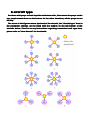
Set up aircraft type and parameters. Fill in local magnetic declination ( West is
(4)
(4)Set
positive, East is negative)
Check the configuration direction of IMU & GPS
(5)
(5)Check
After completing the installation guide, can test fly manually.
(Please refer to the below website for magnetic declination)
http://www.ngdc.noaa.gov/geomagmodels/struts/calcDeclination