1
Programming
SYSTEM A
PH LINE
PH LINE
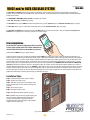
The Voice/Data Cellular System can be programmed for certain maintenance features.
Normally these do not need to be set or adjusted. This programming can be done locally
at the cellular system itself using a touch tone butt set as a programming tool or remotely
by calling the cellular system using a touch tone telephone.
RS 232
AL
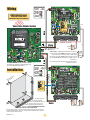
Program Slide Switch - Slide this switch to program when programming the board LOCALLY
using a touch tone telephone. Be sure to switch back to Normal when finished programming.
Cellular voice will NOT work with program slide switch set to program.
M
M
OR
N
DATA OUT
DATA IN
BUSY OUT
BUSY IN
GROUND
A
GR
O
PR
Setting the Master Code for Voice/Data Cellular System:
Slide switch to Program
Connect a touch tone phone to System A phone terminals. Press and release the Master Code push button. Enter on the phone the new 4 digit Master
Code and then press *. A tone should be heard in the phone ear piece. The new master code is now programmed. Hang up the phone to end programming.
Note: The cellular system’s master code MUST be the SAME as System A 1830 master code. This is how the DKS cellular server identifies the cellular
MASTER
system to contact it if needed. Set the slide switch back to Normal if done, or leave in Program if more programming will be done.
CODE
Cycle Power to the Cellular Module:
This will cycle power to the cellular module if power is ON or it will turn ON the module if it is OFF. This allows the module to re-connect with the cellular network.
Slide Switch to Program:
*87 Master Code(Beep) 01*(Beep) 1*(Beep) to cycle power or 0*(Beep) to NOT cycle power.
Hang up Phone Slide switch back to Normal if done programming.
TCP/RS 232 Factory Defaults
This will RESET the TCP/RS 232 module back to factory defaults. See table A for factory default settings.
Slide switch to Program:
*87 Master Code(Beep) 02*(Beep) 1*(Beep) to reset defaults or 0*(Beep) to NOT reset defaults.
Hang up phone. Slide switch back to Normal if done programming.
Cycle Power to Cellular Module Schedule:
This schedules the number of days between automatic power cycling of the cellular module. This allows the module to re-connect with the cellular network.
0= no cycle. 1= every day, 2= every two days, etc. Up to 9 days. (0-9)
Factory default setting: 3 days.
Slide switch to Program
*87 Master Code(Beep) 03*(Beep) 0-9*(Beep) number of days to cycle power.
Hang up phone. Slide switch back to Normal if done programming.
Number of Rings to Answer Call:
Sets the number of rings for an incoming call before the cellular system will answer. 2= two rings, 3= three rings, etc. Up to 9 rings. (2-9)
Normally the 1830 will answer on the second ring. In this case the cellular system will listen in for DTMF tones *87 Master code. If received, the cellular system will
stay on the line for programming while the 1830 will hang up. If any other DTMF tones are received, the cellular system will ignore them. If the 1830 does not answer
on the second ring, the cellular system will answer on the programmed number of rings.
Factory default setting: 5 rings.
Slide switch to Program
*87 Master Code(Beep) 04*(Beep) 2-9*(Beep) number of rings before answering call.
Hang up Phone. Slide switch back to Normal if done programming.
TCP/RS 232 Power Cycle:
Sometimes it is necessary to cycle power to the TCP/RS 232 module to re-establish an Ethernet connection to the cellular module.
Slide switch to Program
*87 Master Code(Beep) 05*(Beep) 1*(Beep) to cycle power to TCP/RS 232 module or 0*(Beep) to not cycle power.
Hang up phone. Slide switch back to Normal if done programming.
Multiple Program Note: Once the *87 Master Code(Beep) has been keyed in and programming mode is entered, It is possible to program multiple functions without
leaving the programming mode. Just complete one program step and then go to the next.
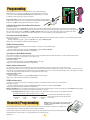
Programming Example: Master Code is 1234. Cycle power to the cellular module and then cycle power to the TCP/RS 232 module.
*871234(Beep) 01*(Beep) 1*(Beep) 05*(Beep) 1*(Beep)
enter
programming
mode
cycle
module
power
cycle
TCP/RS 232
power
Remotely Programming
Hangup
exit
programming
mode
The cellular system will remember the commands
received and execute them in order when program
mode is exited.
Note: DTMF tones don’t work well over the cellular network.
It is NOT recommended REMOTELY programming when
using DTMF tones.
The Voice/Data Cellular System can also be programmed remotely from a touch tone telephone. It is best to use a telephone with
a desktop keypad and not a keypad in the handset so that the Beeps can be heard.
Call the telephone number of the cellular system. After a couple of rings the system will answer and respond with an answer tone.
Programming may now proceed as above. To end programming press # and then hang up.
1800 065-C-7-15
4