1
User Manual of "TURNIGY' Series B~shleSs
Speed Controller
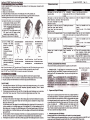
[PROGRAM THE ESCI
Doc Ver. HK-13-VZ-101119
1
+
ForwardIReverse
with Brake
Enter the corresponding
programmable item, the
RED LED flashesfor several
bmes, the times presents the
current value of this item
4
+
Red LED flashes
L
I
I
Hold the SET key,
Switch on the ESC
-
-3-
Proclrammable Value
Tum off the ESC,
Turn on the transmitter
I
Page
Green LED flashes
for 1 time
Enter the 1st item
'Runn~ngMode"
Release*
SET key
Press the SET key to choose the
programmable value , the RED LED
flashes for several times, the times
presents the serial number of the value
you are choosing
20%
SET key
Hold SET key for 3 seconds
Hold SET key for 3 seconds
I
I /--..-.The following steps are just like the above steps---
/
Hold SET key for 3 seconds
Green LED
for N times
,
5
*
33
5'
8
;
I1
Release) Enter the Nthitem
!Ml!'.I
i;
Press SET key to choose the value. the
flash times of RED LED means the serial
number of the value (1 time means the Ist
value, 2 times means the 2nd value...)
SET key
S?
I I i.I '
-5
*
-
K
B
m
*
In the program process, the motor will emit
tone at the same time when the LED is flashing.
f
If the "N" is bigger than the number " 5 , we e a long time flash and long "Beep---" tone to represent
"5,so it is easy to identify the items of the g number.
For example, if the LED flashes as the foll&ing:
"A long time flash + a short time flash" (Motor sounds "Beep---Beepn) = the No. 6 item
"A long time flash + 2 short time flash" (Motor sounds 'Beep--BeepBeep")
= the No. 7 item
= the No. 8 item
"A long time flash + 3 short time flash" (Motor sounds "Beep-BeepBeepBeep")
And so on.
100%
2.
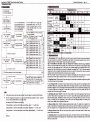
Red LED flashes Itime, choose "0%"
Red LED flashes 2 times, choose "5%"
Ptess' Red LED flashes 3 times, choose " 10%"
SET key Red LED flashes 4 times, choose " 15%"
Red LED flashes 5 times, choose "20%"
Red LED flashes 6 times, choose "25%
Red LED flashes 7 times, choose ''30%"
Red LED flashes 6 times, choose "40%
flashes Itime, choose "None7'
flashes 2 times, choose "2.6V"
R d LED flashes 3 times, choose "2.8N"
I
SE;~&
I R& LED flashes 4 times, choose "3.OV"
d LED flashes 5 times, choose "3.2Vn
d LED flashes 6 times, choose " 3.4V"
for 3 times
80%
Press'
5-,
- 1
60%
-
"
Enter the 2nd item
"Drag Brake Force "
40%
Red LED flashes for 1 time to choose
"Forward with brake"
Red LED flashes for 2 times to choose )
-.n
SETkeY ForwardlReversewith brake"
Hold SET key lor 3 seconds
Greln LED flashes
for 2 times
.b c k
Crawler
Attention: The italics texts in the abov,djform are the default seitings.
&
3.1.Running Mode: With "Forward
Brake" mode, the car can go forward and brake, but cannot go backward,
this mode is suitable for competitioq; "ForwardlReverse with Brake" mode provides backward function, which is
suitable for training. The "Rock Crawler" mode is only used for rock crawler.
Note: "ForwardlReverse y f t h Brake" mode uses "Double-Click" method to make the car go backward.
When you move the thrott stick horn forward zone to backward zone for the first time, the ESC begins to brake
the motor, the motor spe s down but it is still running, not completely stopped, so the backward action is NOT
happened now. When the hrottle stick is moved to the backward zone again (The 2nd"click"), if the motor speed is
slowed down to zero (i.e. topped), the backward action will be occurred. The "Double-Click" method can prevent
mistakenly reverse when t e brake function is frequently used in steering.
With "Rock Crawler" mod , the reverse action will be happened immediately when the throttle stick is moved to
backward zone. Please se the "Drag Brake Force" to 100% if you choose the "Rock Crawler" mode.
1
3.2.Drag Brake Force: SQ the amount of drag brake applied at neutral throttle to simulate the slight braking effect
of a neutral brushed motor while coasting.
3.3.Low Voltage Cut-Off: The function is mainly to prevent the lithium battery pack from over discharging. When
using lithium battery pack, please s t the suitable value for low-voltage protection as you like. The ESC monitors
the battery's voltage at any time, if t(e voltage is lower than the threshold, the output power will be reduced to 50%
in 2 seconds. Please drive and stq the car at the side of the racing track as soon as possible, the ESC will
completely cut off the output powerR
i 10 seconds.
3.4.Stat-t Mode (Also called "~unch"): Select from "Levell (Soft)" to "Level 9 (Very aggressive)" start mode as
your like. Please note that if you @Hoose"Level 7" to "Level 9", you'd better use good quality battery pack with
powerful discharge abllity, otherwi& these modes cannot get the bursting start effect as you want. If the motor
cannot run smoothly (the motor igtrembling), it may caused by the weak discharge ability of the battery pack,
please choose a better battery or inqreasethe gear rate.
3.5.Maximum Brake Force: The;ESC provides proportional brake function. The brake force is related to the
position of the throttle stick. Maximum brake force refers to the force when the throttle stick is located at the top
point of the backward zone. Avery ldrge brake force can shorten the brake time, but it may damage the gears.
3.6.Maximum Revers? Force: Sets how much power will be applied in the reverse direction. Different value
makes different reverse speed.
3.7.lnitial Brake Force: It is also called "minimum brake force", and it refers to the force when the throttle stick is
located at the initial position of the backward zone. The default value is equal to the drag brake force, so the brake
effect can be very smooth.