1
User Manual of "TURNIGY" Series Brushless Speed Controller
[TROUBLE SHOOTING]
In order to make the ESC fit the throttle range, you must calibrate it for the following cases; otherwise the ESC
cannot work properly.
1) Begin to use a new ESC;
2) Begin to use a new transmitter;
3) Change the settings of neutral position of the throttle ,stick,ATV or EPA parameters, etc.
There are 3 points need to be set, they are the top point of "forward"," backward" and the neutral point.
a~~
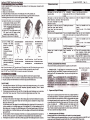
The following pictures show how to set the throttle range with a ~ u t a b transmitter.
A) Switch off the ESC, turn on the transmitter,
set the direction of throttle channel to "REV".
set the "EPAIATV" value of throttle channel to
"loo%", and disable the 'ABS" brake function
of your transmitter. (*Note2)
B) Hold the "SET" key and then switch on the
ESC, when the red LED begins to flash,
release the key immediately. ('Note3)
(Please refer to the picture on the right side)
C) Set the THREE points
according to the steps
shown in the picture on
the right side.
1) Neutral point
2) End point of forward
direction
3) End point of backward
direction
D) When the process of
calibration is finished, the
motor can be started after
3 seconds.
end pmluon d bsdrwrd.
R e s 'SET he): the 5rwn
Pnrsa
LED Mashes o m andmaPor
LEQllea(las hriw and motor E D mmhm Uum andmffw
s&
'Beep. h n e
.MI-kuy. Um Green
emits .EmepBeepmtone
Pmas ' S E T ksy.
me Gman
emlb '8sspSesp.Esep'lone
Note2: Ifyou don't release the "SET" key after the red LED begins to flash, the ESC will enter the programmode, in
such a case, please switch off the ESC and re-calibrate the throttle range again from step A to step D.
Note3: The "SETnkey of TURNIGY-18A-SL is beside the main switch of the controller.
a) In normal use, if the throttle stick is in the neutral range, neither the red LED nor the green LED lights.
b) The red LED lights when the car is.run forward or backward and it will flash quickly when the car is braking.
c) The green LED lights when the throttle stick is moved to the top point of the forward zone.
[ALERT TONES1
1. lnput voltage abnormal alert tone: The ESC begins to check the input voltage when power on, if it is out of the
normal range, such an alert tone will be emitted: 'beep-beep-, beepbeep-, beep-beep-" (There is 1 second
time interval between every "beep-beep-" tone).
2. Throttle signal abnormal alert tone: When the ESC can't detect t e normal throttle signal, such an alert tone
will be emitted: "beep-, beep-, beep-" (There is 2 seconds time in rval between every "beep-" tone).
1
1
[PROTECTION FUNCTION]
!
1. Low voltage cut-off protection: If the voltage of a lithium battery pack is lower than the threshold for 2 seconds,
the ESC will cut of the output power. Please note that the ES cannot be restarted if the voltage of each
lithium cell is lower than 3.5V.
For NiMH battery packs, if the voltage of the whole NiMH battery ack is higher than 9.OV but lower than 12V,
it will be considered as a 3 cell lithium battery pack; If it is lowe than 9.OV, it will be considered as a 2 cell
lithium battery pack. For example, if the NiMH battery pack is 8.0 , and the threshold is set to 2.6VlCell. so it
will be considered as a 2 cell lithium battery pack, and the low-vo!tage cut-off threshold for this NiMH battery
pack is 2.6*2=5.2V.
2. Over-heat protection: When the temperature of the ESC is over a factory preset threshold for 5 seconds, the
ESC will cut off the output power. You can disable the over-heat kotection function for competition race.
3. Throttle signal loss protection: The ESC will cut off the output power if the throttle signal is lost for 0.2 second.
cl
i
11
Doc Ver. HK-13-V2-101119
Page
- 2-
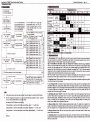
battery pack and ESC are not Replace the connectors
correct
After power on, motor can't w rk, but Input voltage is abnormal, too Check the voltage of the battery
pack
emits "beep-beep-, beep-beep " alert high or too low.
tone. (Every "beep-beep-" has a time
interval of 1 second )
After power on, motor can't work, but Throttle signal is abnormal
Check the transmitter and the
receiver
emits "beep-, beep-, beep-" alert tone.
(Every "beep-" has a time interval of
Check the wire of the throttle
about 2 seconds)
channel
The motor runs in the opposite direction The wire connections between Swap any two wire connections
ESC and the motor need to be between the ESC and the motor.
changed
The motor suddenly stops running The throttle signal is lost
Check the transmitter and the
while in working state
receiver
Check the wire of the throttle
I channel
c
The ESC has entered the Low I ReDlace the batterv
- ~. a c k
Voltage Protection Mode
Random stop or restart or irregular Some connections are not Check all the connections: battery
working state
reliable
pack connections, throttle signal
wire, and motor connections, etc.
There is strong Electro - Reset the ESC to resume normal
Magnetic interference in flying operation. If the function could not
resume, you might need to move to
field.
another area to run the car.
[OPTIONAL ACCESSORIES FbR UPGRADE1
We provide the following optional accessories for upgrade your power system:
Mark. Direction of the airflow
1. Cooling fan (12V): The high voltage fan is necessary when you are using
and the impeller
........
batterv oack more than 6 cells of NiMH. It is located on the heat sink of the ESC. it
helps cool the ESC with downward airtlow. The picture on the right side shows
the installation.
WARNING! Please note theioriginal fan (5V) combined with the ESC can
ONLY work with a 2 cells lithium battery pack or 4 6 cells NiMH battery pack.
Please NEVER use i t wlth a 3 cells lithium battery pack or NiMH battery pack
more than 6 cells, otherwise i t mag be destroyed.
Please check the label of the fan carefully t o confirm its working voltage
before using It.
sound is emitted
I
id
)
2.
1
1
Program card (Digital LED Display).
Program card is an optional accessory which needs to be purchased separately. It
has a friendly user interface. The process of programming the ESC becomes quite
easy and fast with this pocket sized device. When the programmable value needs
to be changed, please just plug the control wires of the ESC (trio wires with black,
red and white color) into the socket of the program card (The socket is on the right
corner, and marked with
), m u h e n connect the main battery pack to the
ESC, each item's value will be shown on the program card. Use "ITEM" and
VALUE" buttons to select the programmable items and new values, and then press
"OK" button to store the new settings into the ESC.
3. Advanced program box (LCD Display).
Advanced program box is an optional accessory which needs to be purchased separately.
It has LCD display to show the programmable items, so it can work as an individual device to set the ESC. And it
can also work as an USB adapter to connect the ESC with a PC to update the ESC firmware online.