1
Manual of Sensorless Brushless Speed Controller
HW-SM001ENG-20120606
Page 3 of 3
Move the throttle stick to bottom position, and make
sure it is Zero throttle at this position.
After power on, motor does not work,
such an alert tone emits:
“beep-, beep-, beep-” (Every “beep-” has
a time interval of about 0.25 second)
After power on, motor does not work, a
special tone “
” emits after 2 beep
tone (beep-beep-)
The motor runs in the opposite direction
The throttle stick is not in the
bottom (lowest) position
Direction of the throttle channel is
reversed, so the ESC has entered
the program mode
The connection between ESC and
the motor need to be changed.
Set the direction of throttle channel correctly
The motor stop running while in working
state
Throttle signal is lost
Check the receiver and transmitter
Check the cable of throttle channel
Land RC model as soon as possible, and then
replace the battery pack
ESC has entered Low Voltage
Cut-off Protection mode
Swap any two wire connections between ESC and
motor
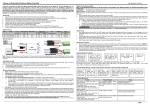
Normal startup procedure:
Move throttle
stick to bottom
and then switch
on transmitter.
Several “beep-” tones
emits, which means
the quantity of the
lithium battery cells
Connect battery pack
to ESC, special tone
like “ 123” means
power supply is OK
When the self-test
is finished, a long
“beep-----”
tone
emits
Move throttle stick
upwards to go flying
Throttle range setting: (Throttle range should be reset whenever a new transmitter is being used)
Switch on
t r a n s m i t t e r,
move throttle
stick to top
Connect battery
pack to ESC,
and wait for
about 2 seconds
“Beep-Beep-” tone emits,
means the throttle range
highest point has been
correctly confirmed
Move throttle stick to the
bottom, several “beep-” tones
presents the quantity of battery
cells
A long “Beep-” tone emits,
means throttle range lowest
point has been correctly
confirmed
Program the ESC with your transmitter (4 Steps):
2. Select programmable item:
1.
Enter program mode
2.
Select programmable item
3.
Set item’s value (Programmable option)
4.
Exit program mode
1.
Enter program mode
1)
2)
3)
Switch on transmitter, move throttle stick to
top , connect the battery pack to ESC
Wait for 2 seconds, the motor should emit
special tone like “beep-beep-”
Wait for another 5 seconds, special tone like
“
” emits, which means program mode is
entered
After entering program mode, you will hear 8 tones in a loop with
the following sequence. If you move the throttle stick to bottom
within 3 seconds after one kind of tones, this item will be selected.
1. “beep”
brake
(1 short beep)
2. “beep-beep-”
battery type
(2 short beeps)
3. “beep-beep-beep-”
cutoff mode
(3 short beeps)
4. “beep-beep-beep-beep-” cutoff threshold (4 short beeps)
5. “beep-----”
startup mode
(1 long beep)
6. “beep-----beep-”
timing
(1 long 1 short)
7. “beep-----beep-beep-”
set all to default (1 long 2 short)
8. “beep-----beep-----”
exit
(2 long beeps)
Note: 1 long “beep-----” = 5 short “beep-”
3. Set item value (Programmable option):
4. Exit program mode
You will hear several tones in loop. Set the value matching to a tone by moving throttle stick
to the top position when you hear the tone, then a special tone “
” emits, means the
value is set and saved. (Keeping the throttle stick at the top position, you will go back to step
2 and you can select other items; Moving the stick to the bottom position within 2 seconds
will exit the program mode directly)
There are 2 ways to exit
program mode:
1. In step 3, after special
“beep-”
“beep-beep-”
“beep-beep-beep”
Items
1 short tone
2 short tones
3 short tones
Brake
Off
On
Battery type
Li-ion / Lipo
NiMH / NiCd
Cutoff mode
Soft-Cut
Cut-Off
Low
Medium
High
Normal
Soft
Super soft
Low
Medium
High
Tones
Cutoff threshold
Start mode
Timing
tone “
”, please
move the throttle stick
to the bottom position
within 2 seconds.
2.
In step 2, after hearing
“beep-----beep-----”
tone (that means the
item #8), move the
throttle stick to the
bottom
within
3
seconds.
-