1
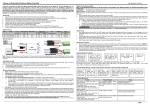
Manual of Sensorless Brushless Speed Controller 5. 6. HW-SM001ENG-20120606 Page 2 of 3 Startup Mode:Normal /Soft /Super-Soft ,(300ms / 6s /12s),default is Normal. Normal is preferred for fixed-wing aircraft. Soft or Super-soft are preferred for helicopters. The acceleration of the Soft and Super-Soft modes are slower in comparison, usually taking 6 seconds for Soft startup or 12 seconds for Super-Soft startup from zero throttle advance to full throttle. If the throttle is closed (throttle stick moved to the bottom position, zero throttle) and opened again (throttle stick moved upward) within 3 seconds after the initial startup, the restart-up will be temporarily changed to normal mode to get rid of the chances of a crash caused by slow throttle response. This special design is suitable for aerobatic flight when quick throttle response is needed. Timing:Low / Medium / High,( 3.75°/15°/26.25°),default is Low. Note2 Usually, low timing or medium timing is suitable for most motors. In order to get higher speed and bigger output power, please choose High timing. Note2: After changing the timing setting, please test your RC model on ground before taking off! Begin To Use Your New ESC Note3: In the following instructions, we use the words of “Top position” and “Bottom position” to indicate the location of the throttle stick. Top Position: The throttle value is 100% at this position. Bottom Position: The throttle value is 0% at this position. Please start the ESC in the following sequences: 1. Move throttle stick to the bottom position (zero throttle) and then switch on the transmitter. 2. Connect battery pack to the ESC, the ESC begins the self-test process, a special tone “ 123” emits, means the voltage of the battery pack is in normal range, and then N “beep” tones emits, means the cells quantity of a lithium battery pack. Finally a long “beep------” tone emits, means the self-test is OK, and the aircraft/helicopter is ready to take off. If nothing is happened, please check the battery pack and all the connections; If a special tone “ ” emits after 2 beep tones (“beep-beep-”), means the ESC has entered the program mode, it is because the throttle channel of your transmitter is reversed, please set it correctly; If the very rapid “beep-beep-, beep-beep-” tones emits, means the input voltage is too low or too high, please check your battery’s voltage. 3. “VERY IMPORTANT!” Because different transmitter has different throttle range, please calibrate throttle range before flying. Please read the instruction on page 3------“Throttle Range Setting”. Alert Tone 1. Input voltage is abnormal: The ESC begins to check the voltage when the battery pack is connected, if the voltage is not in the acceptable range, such an alert tone will be emitted: “beep-beep-, beep-beep-,beep-beep-” (Every “beep-beep-” has a time interval of about 1 second. ) 2. Throttle signal is abnormal: When the ESC can’t detect the normal throttle signal, such an alert tone will be emitted: “beep-, beep-, beep-”. (Every “beep-” has a time interval of about 2 seconds) 3. Throttle stick is not in the bottom position: When the throttle stick is not in bottom (lowest) position, a very rapid alert tone will be emitted: “beep-, beep-, beep-”. (Every “beep-” has a time interval of about 0.25 second.) Protection Function 1. Start up failure protection: If the motor fails to start within 2 seconds, then the ESC will cut-off the output power. In this case, the throttle stick MUST be moved to the bottom position (zero throttle) again to restart the motor. (Such a situation happens in the following cases: The connection between ESC and motor is not reliable, the propeller or the motor is blocked, etc.) 2. Over-heat protection: When the temperature of the ESC is over 110 Celsius degrees, the ESC will reduce the output power. 3. Throttle signal loss protection: The ESC will reduce the output power if throttle signal is lost for 1 second, further loss for 2 seconds will cause the output to be cut-off completely. Program Example Setting “Start Mode” to “Super-Soft”, i.e. option #3 of the programmable item #5 1. Enter Program Mode Switch on transmitter, move throttle stick to top position, connect battery pack to ESC, wait for 2 seconds, “beep-beep” tone should be emitted. Then wait for another 5 seconds, special tone “ ” emits, which means program mode is entered. 2. Select Programmable Items Now you’ll hear 8 tones in a loop. When a long “beep------” tone emits, move throttle stick to bottom to enter the “Start Mode” 3. Set Item Value (Programmable Options) “Beep-”, wait for 3 seconds; “Beep-beep-”, wait for another 3 seconds; then you’ll hear “beep-beep-beep”, move throttle stick to the top position, then a special tone “ ” emits, that means you have set the “Start Mode” item to the value of “Super-Soft” 4. Exit Program Mode After the special tone “ ”, move throttle stick to bottom within 2 seconds. Trouble Shooting Trouble Possible Reason After power on, motor does not work, no sound is emitted After power on, motor does not work, such an alert tone emits: “beep-beep-, beep-beep-,beep-beep-” (Every “beep-beep-” has a time interval of about 1 second) After power on, motor does not work, such an alert tone is emits: “beep-, beep-, beep- ”(Every “beep-” has a time interval of about 2 seconds) The connection between battery pack and ESC is not correct Input voltage is abnormal, too high or too low. Check the power connection. Replace the connectors. Check the voltage of battery pack Solution Throttle signal is irregular Check the receiver and transmitter Check the cable of throttle channel -