1
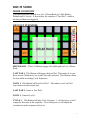
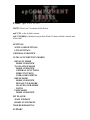
REC 1 – This will enable Record mode for Cycle Sequence 1. You can
record up to 8 steps using the 16 Drum Rack Buttons. Press Cycle 1 to end
recording. While recording, the Clip Stop Buttons show how many steps
you've recorded. This is replace-style recording so, if you exceed 8 steps,
the previous 8 steps will be deleted.
CYCLE 2 – Same as Cycle 1.
REC 2 – Same as Rec 1.
VELOCITY LEVEL – These 4 Buttons set the velocity level of the Drum
Rack/Last Pad 1+2/Cycle 1+2 Buttons. The 4 available velocities (from top
to bottom) are 127, 107, 87 and 67.
16 LEVELS – Switch to 16 Levels Sub-Mode.
16 LEVELS SUB-MODE
DRUM RACK – Same as in Default Sub-Mode.
16 LEVELS – The Last Pad will be assigned to all 16 of these Buttons.
LOCK – This will lock the 16 Levels Buttons so that they stay locked on
the current pad.
VELO – Toggles 16 Levels of velocity. When on, the 16 Level Buttons will
control the velocity of the Last Pad.
8