1
EVS Broadcast Equipment S.A.
Issue 1.1.A - October 2014
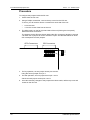
After the system.tar is copied to the DC-100’s Compact Flash disk, reboot the DC-100.
When the DC-100 comes up, it will detect the presence of the system.tar, extract the files,
and reboot itself (again) automatically.
After automatic reboot, the system will be fully operational; no existing configuration files
will be modified or deleted.
In the rare occasions of the DC-100 not rebooting automatically, after 5 minutes,
manually power cycle the unit. It will restart the system normally with the new upgraded
files.
6.3
20
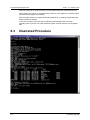
Illustrated Procedure
Firmware Upgrade